Rumble Rummy APK Download – About the Rumble Rummy App
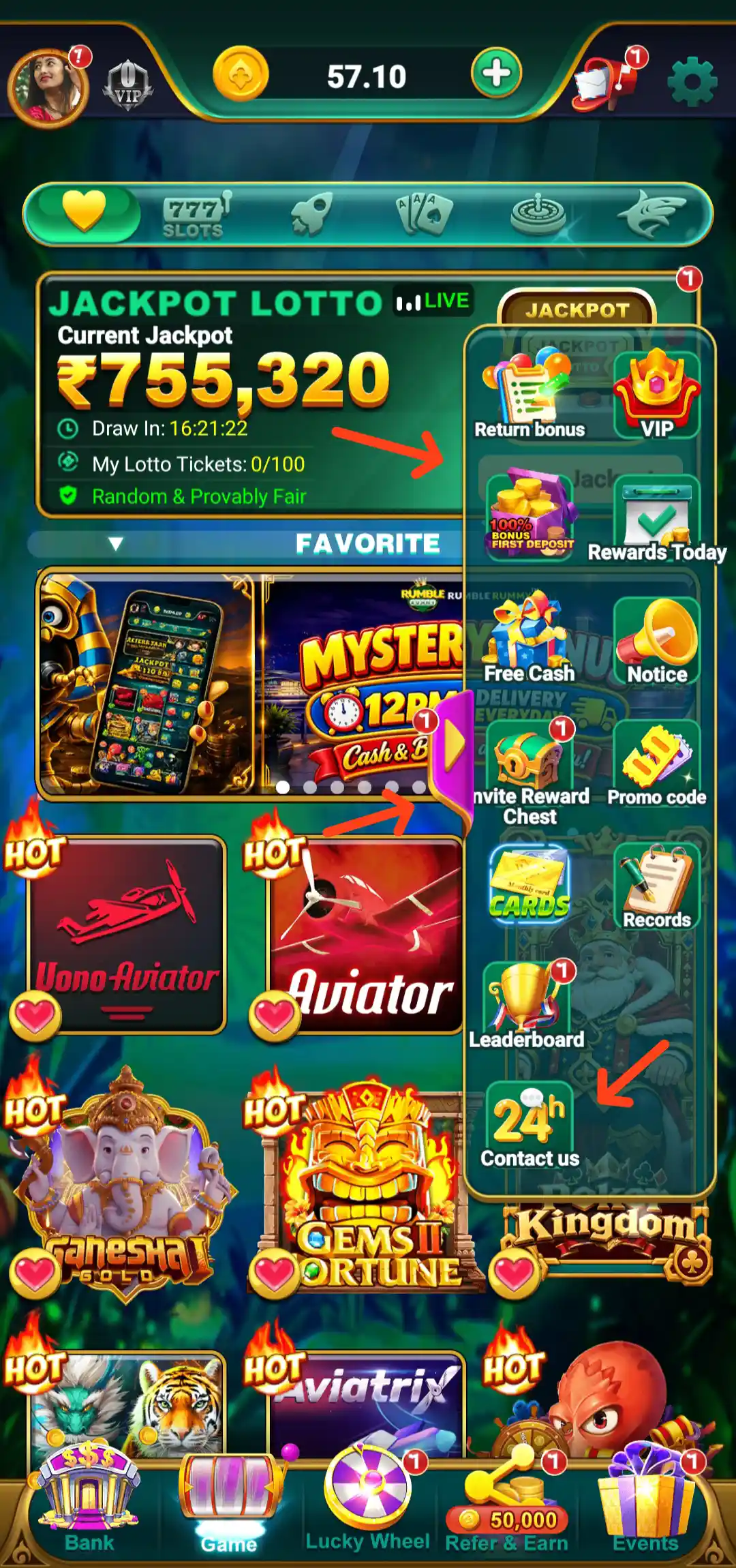
Rumble Rummy is an Android app with a multi-category gaming lobby, account dashboard, wallet and payment tools, promotional activities and referral features. The home screen brings several sections together instead of showing only one type of game. Users can browse 777 Slots, Multiplayer, Skill Games, Aviator-style flight games and Fishing, while the side menu provides access to Free Cash, Return Bonus, Rewards Today, Promo Code, Invite Reward Chest, VIP and other account options.
The Rumble Rummy App also includes account screens for Login, balance details, Deposit, withdrawal-related payment management and bank or UPAY wallet verification. This guide explains the options and labels visible in the app, including the referral commission levels, reward activities, leaderboard, Lucky Wheel and customer support. The interface, offers and eligibility rules can change, so check the latest information shown in your own account before using a feature.
Rumble Rummy App Details
The app details provided for this page are listed below. Promotional values and technical details can be updated by the service, so compare them with the current official download page before installing.
- App name: Rumble Rummy
- APK size: 102 MB
- Signup bonus shown: ₹57
- Minimum withdrawal stated: ₹100
- Rating supplied: 4.3 / 5 from 629 reviews
- Platform: Android APK
- Referral programme: ₹6+ referral bonus and 0.7% bet commission for qualifying direct referrals, subject to programme terms
Rumble Rummy Welcome Screen, Login and Account Access
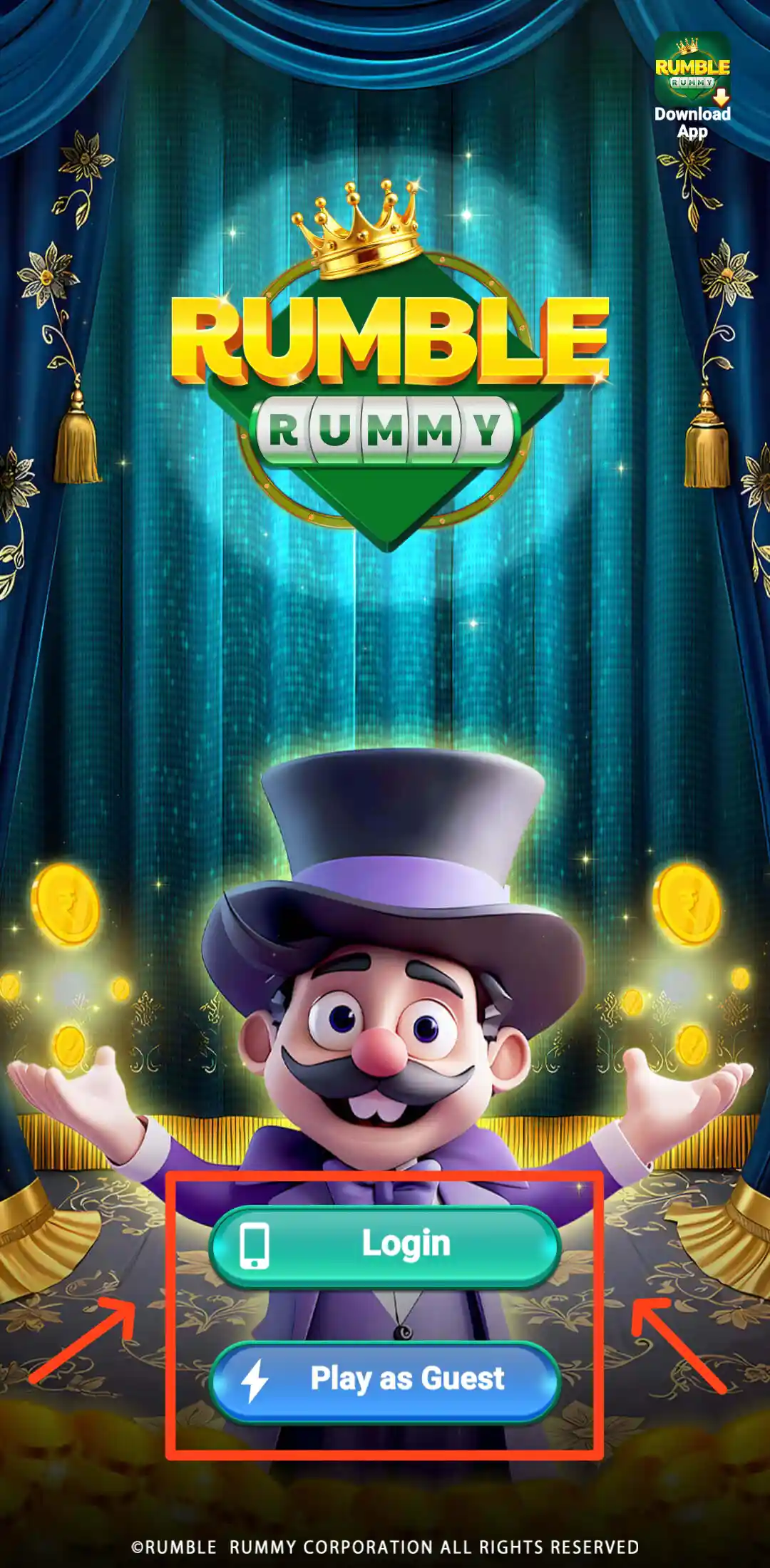
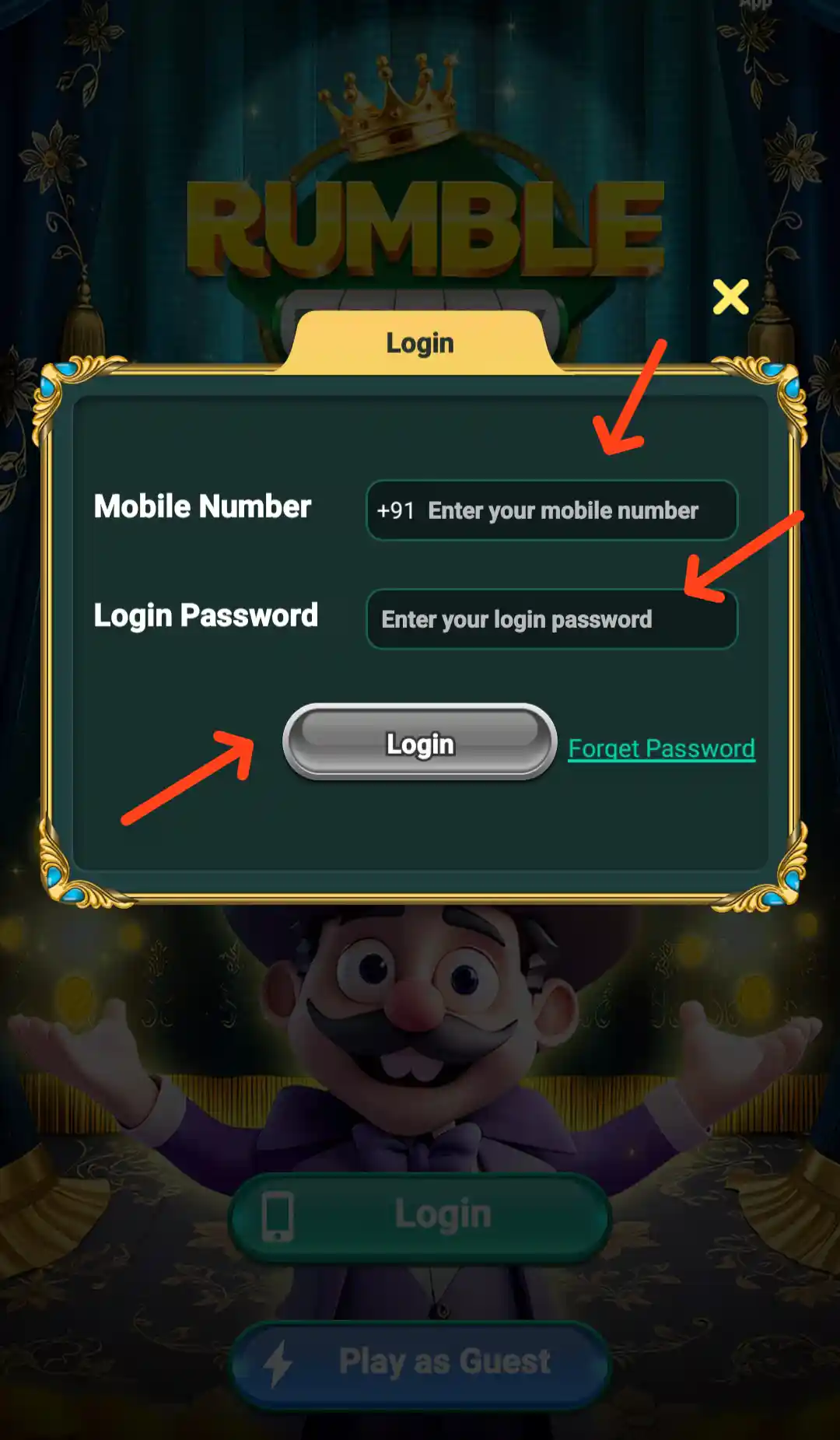
The welcome screen displays the Rumble Rummy branding and a Play as Guest option. The account login page has two fields: Mobile Number +91 and Login Password. A Login button is provided below the fields, along with a Forget Password option for users who cannot access their account.
To sign in, open the app, enter the mobile number connected to your account, type your login password and tap Login. Check the number and password before submitting. If you have forgotten the password, use the recovery option shown on the login page and follow the in-app instructions. The Guest route is displayed separately on the welcome screen; the features available without an account may be different from those available after login.
Keep your password, OTP and verification details private. Use only the account recovery process displayed in the app and do not share login codes with another person.
Rumble Rummy Login Gift and Daily Login Promotion
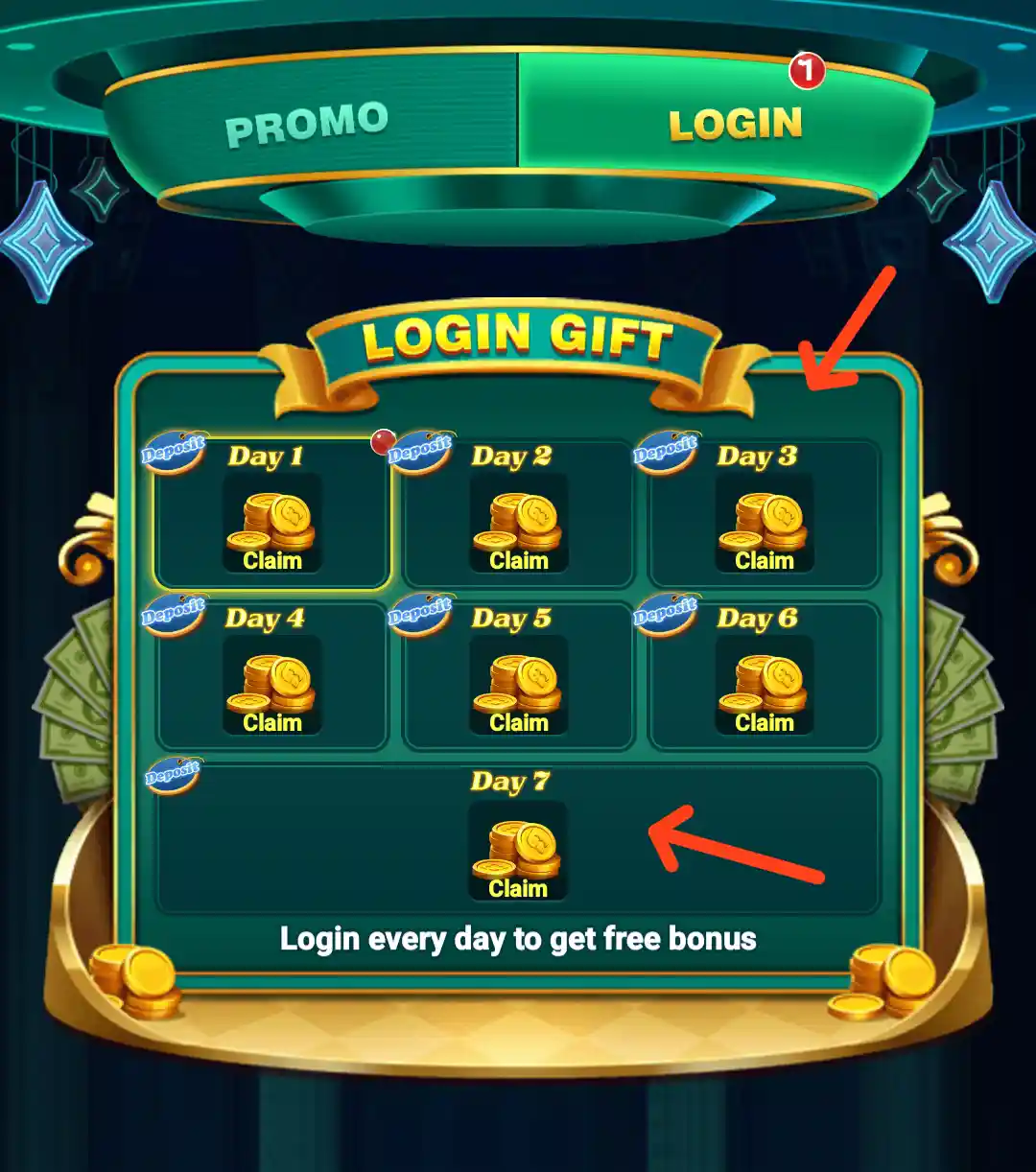
The Login Gift screen is headed PROMO LOGIN and highlights a daily login activity. It displays separate reward markers for 2 Days and 9 Days, with the message “Login every day to get free bonus”. This indicates a login-streak style promotion where the app highlights rewards against particular days.
Open the promotion and check the current calendar, claim button, qualifying days and expiry details. A day-based reward may require consecutive or qualifying logins, depending on the terms shown in the app. Do not assume a reward has been added until the app confirms the claim or the relevant balance is updated.
Rumble Rummy Home Screen and Dashboard Menu
The home dashboard displays the profile picture and VIP shortcut at the top left. The current balance is placed in the top bar with a plus (+) control, while notification and settings icons appear on the right. Below it, a horizontal navigation strip provides quick access to the app's main game categories. The visible category labels include 777 Slots, Multiplayer, Skill and other game areas represented by their icons.
A prominent Jackpot Lotto panel appears in the lobby. It shows a live jackpot amount, a Draw In countdown, My Lotto Tickets and a View Jackpot button. The same panel includes the phrase Random & Provably Fair. The amount and countdown are changing display values, not a promise of a win. The ticket count shown in the supplied lobby screens is 0/100.
The expanded side menu contains shortcuts for Return Bonus, VIP, 100% Bonus First Deposit, Rewards Today, Free Cash, Notice, Invite Reward Chest, Promo Code, Cards, Records, Leaderboard and Contact Us. At the bottom, the fixed navigation includes Bank, Game, Lucky Wheel, Refer & Earn and Events. Each shortcut opens a separate area with its own information and conditions.
Rumble Rummy Game Categories
The app separates games into different categories so that users can move between the lobby sections. The supplied screens show 777 Slots, Multiplayer, Skill Games, Aviator and Fishing. Each category has its own banners and game tiles; the titles and positions may change when the lobby is updated.
Rumble Rummy 777 Slots
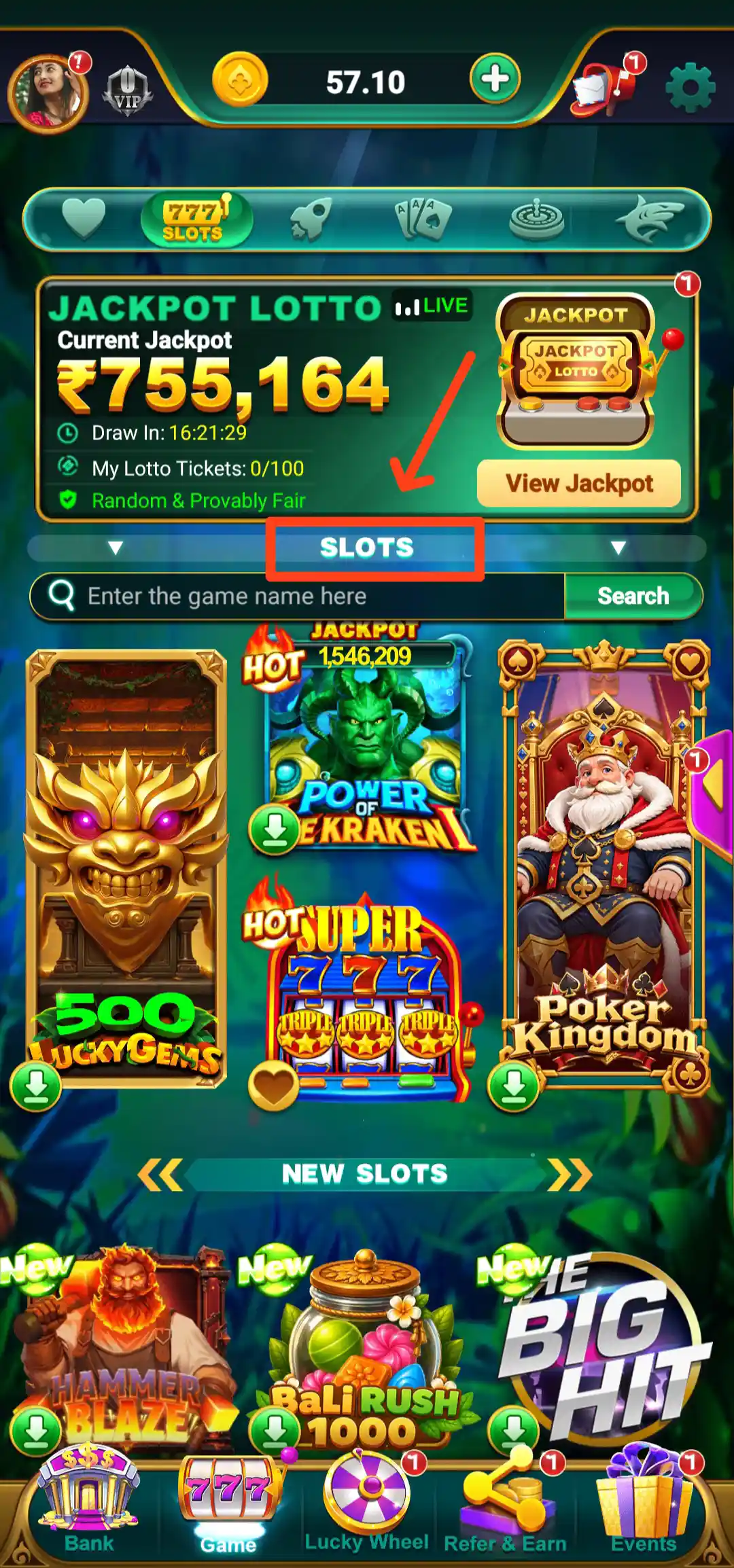
The 777 Slots category has a game search field labelled “Enter the game name here” and a Search option. This is useful when looking for a particular title in the slot lobby. The page displays several themed game cards, including titles such as 500 Lucky Gems, Power of the Kraken, Super 777 Triple Triple and Poker Kingdom. The app may also mark selected games as New or HOT.
Open a slot title to read the rules and see the entry details displayed for that game. The result of a slot round is not determined by the result of a previous round, and no banner or outside tip can guarantee a future result.
Rumble Rummy Multiplayer Games
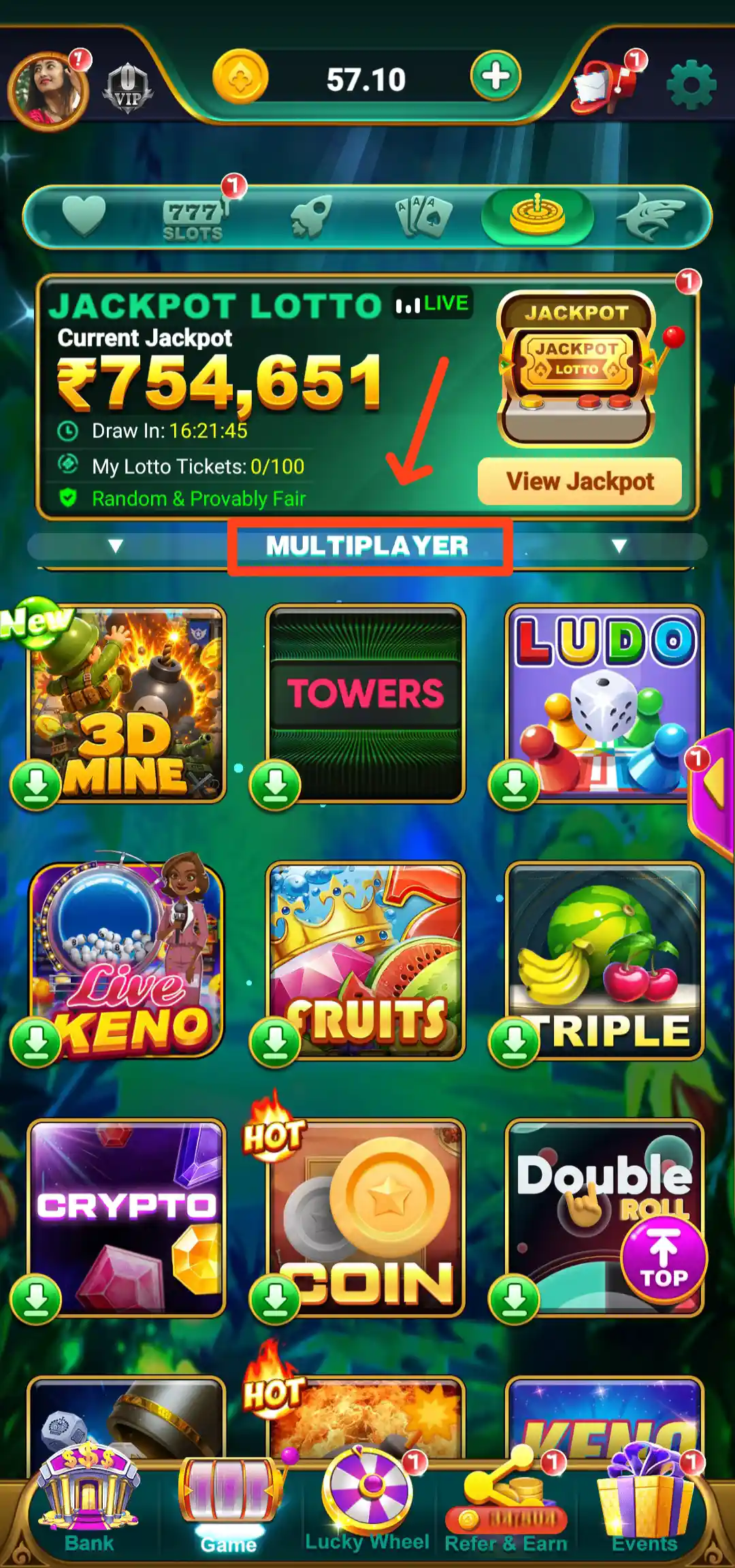
The Multiplayer category is a separate lobby for games designed around player-versus-player or shared-table formats. The supplied screen prominently displays the Multiplayer heading and a Ludo tile. The category has its own game artwork and navigation, distinct from the Slots lobby.
Before joining a multiplayer title, check whether it is a free-entry game or whether the app displays an entry amount. Read the rules for turns, scoring and match completion so you understand how that particular game works.
Rumble Rummy Skill Games
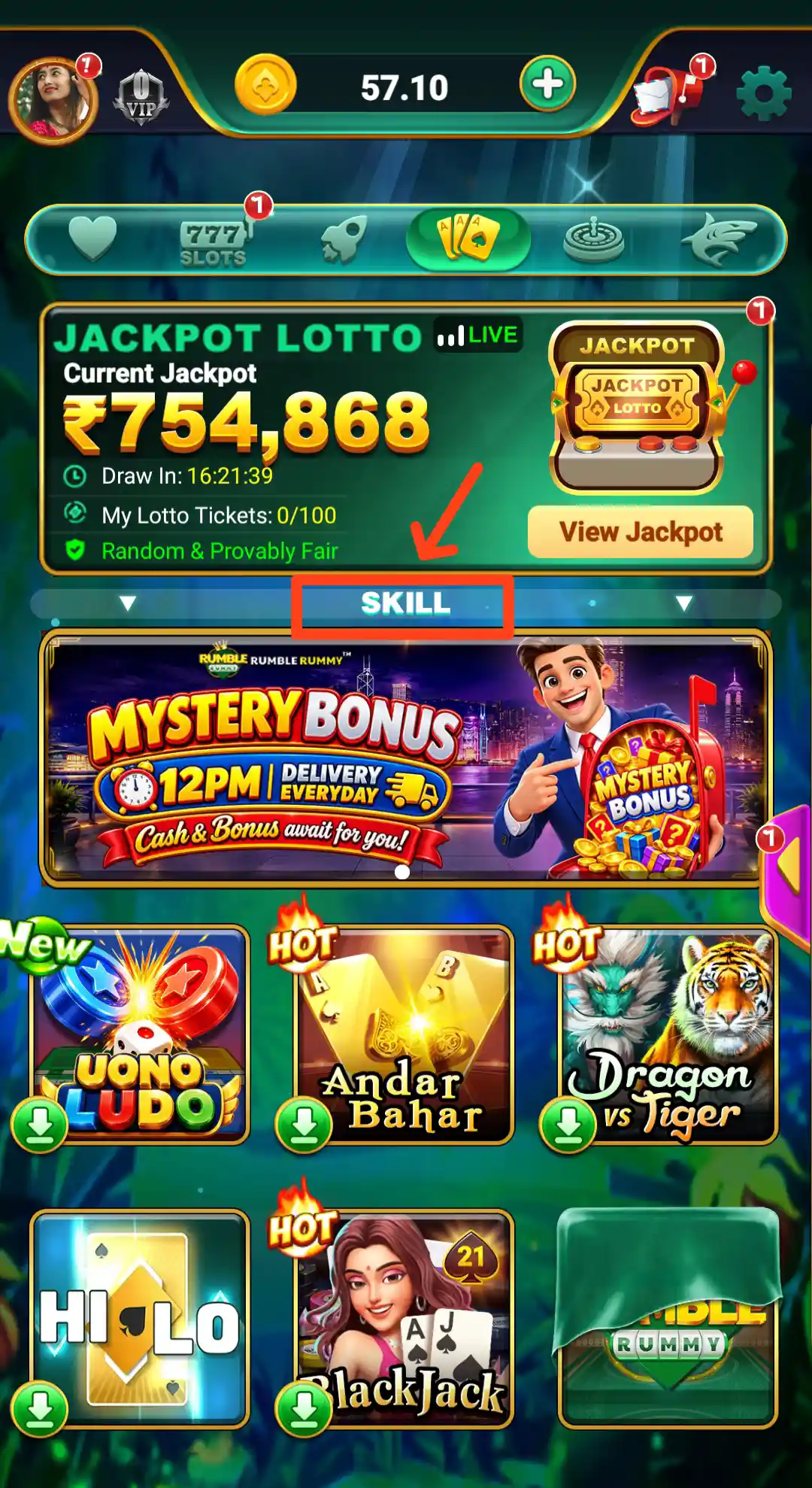
The Skill category displays a Mystery Bonus banner with a 12PM delivery message and a collection of skill-game tiles. The visible titles include Uono Ludo, Andar Bahar, Dragon vs Tiger, Hi-Lo, Blackjack and a Rumble Rummy tile. Some cards carry New or HOT labels. The banner promotes a daily Mystery Bonus and refers to cash and bonus, but the eligibility and claim conditions should be checked in the app.
Skill games can have different rules and formats. Open each title to understand the controls, scoring, match conditions and any entry requirement before playing.
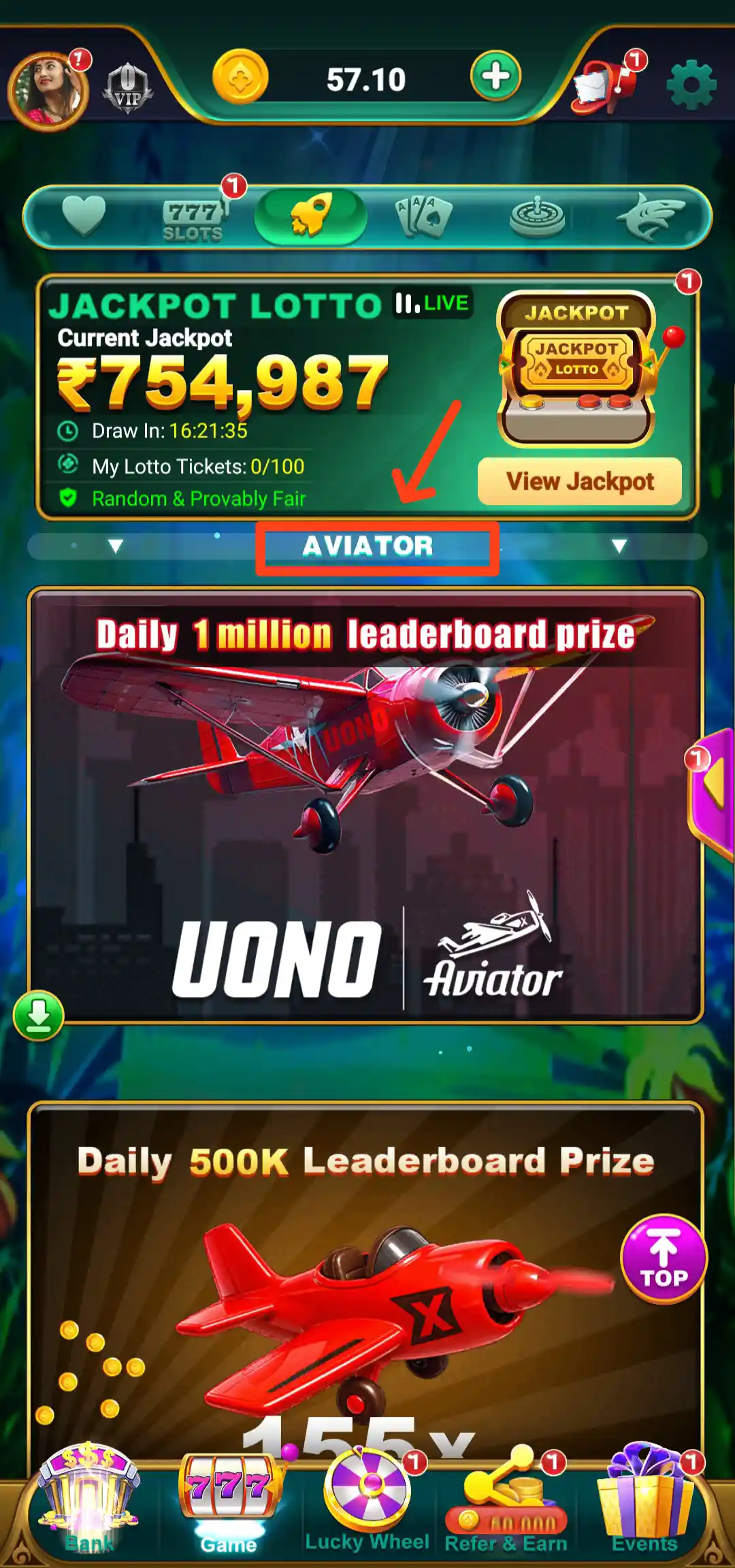
Rumble Rummy Aviator and Flight Games
The flight-game area features Uono Aviator and Aviator banners. The supplied screen also displays promotional leaderboard artwork, including a Daily 1 million leaderboard prize banner and a separate Daily 500K Leaderboard Prize panel. These are promotional prize labels; actual eligibility and award conditions are determined by the active leaderboard rules.
Read the rules and round information before entering a flight-style game. Avoid anyone who claims to predict a round or guarantees a result. Set a limit before playing and do not chase previous losses.
Rumble Rummy Fishing Games
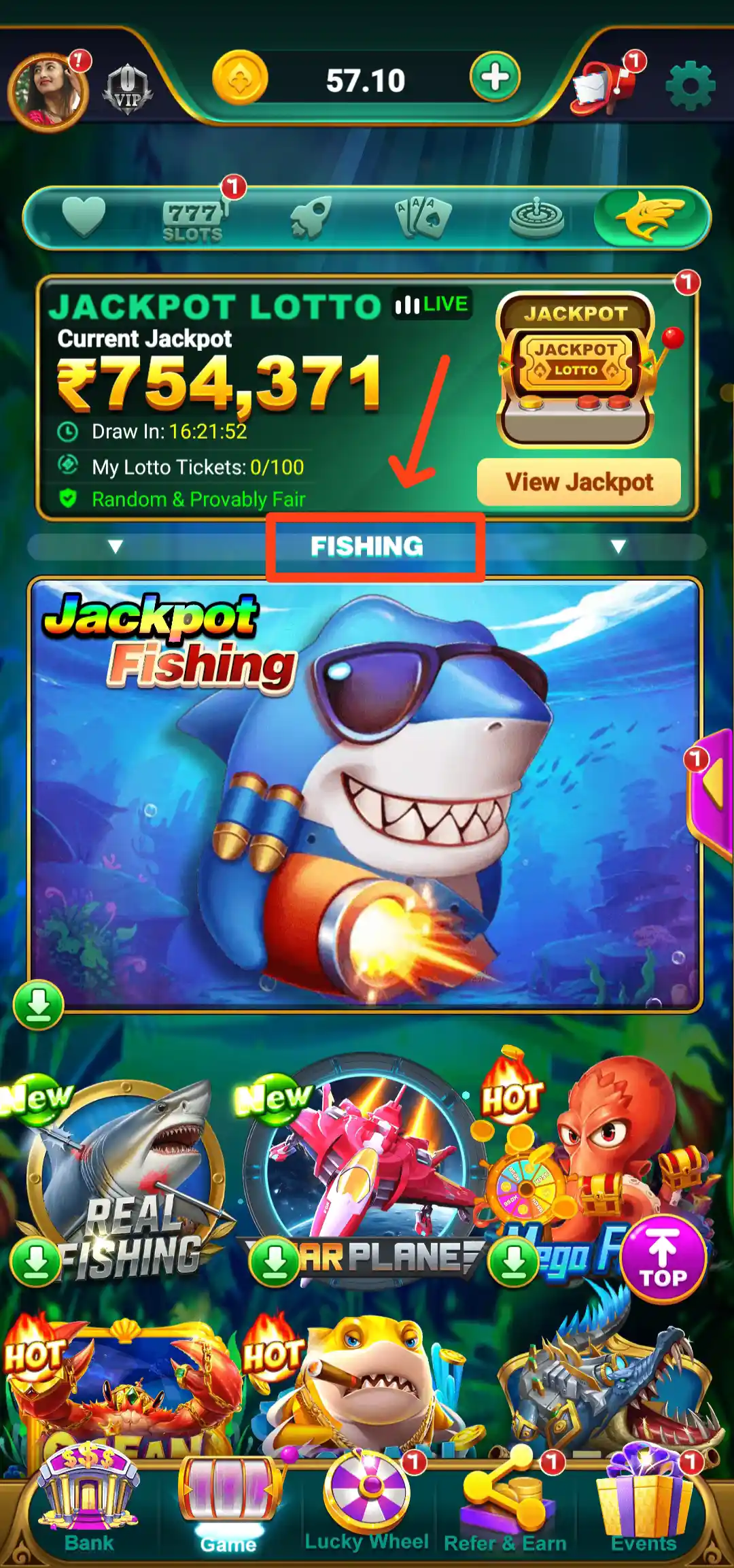
The Fishing category has an underwater theme and a main banner labelled Jackpot Fishing. The lobby also displays a Real Fishing tile and other fish-themed game artwork. New and HOT labels appear on selected tiles. Open a game to check its controls, scoring rules and any amount required to enter.
Rumble Rummy Wallet and Total Balance
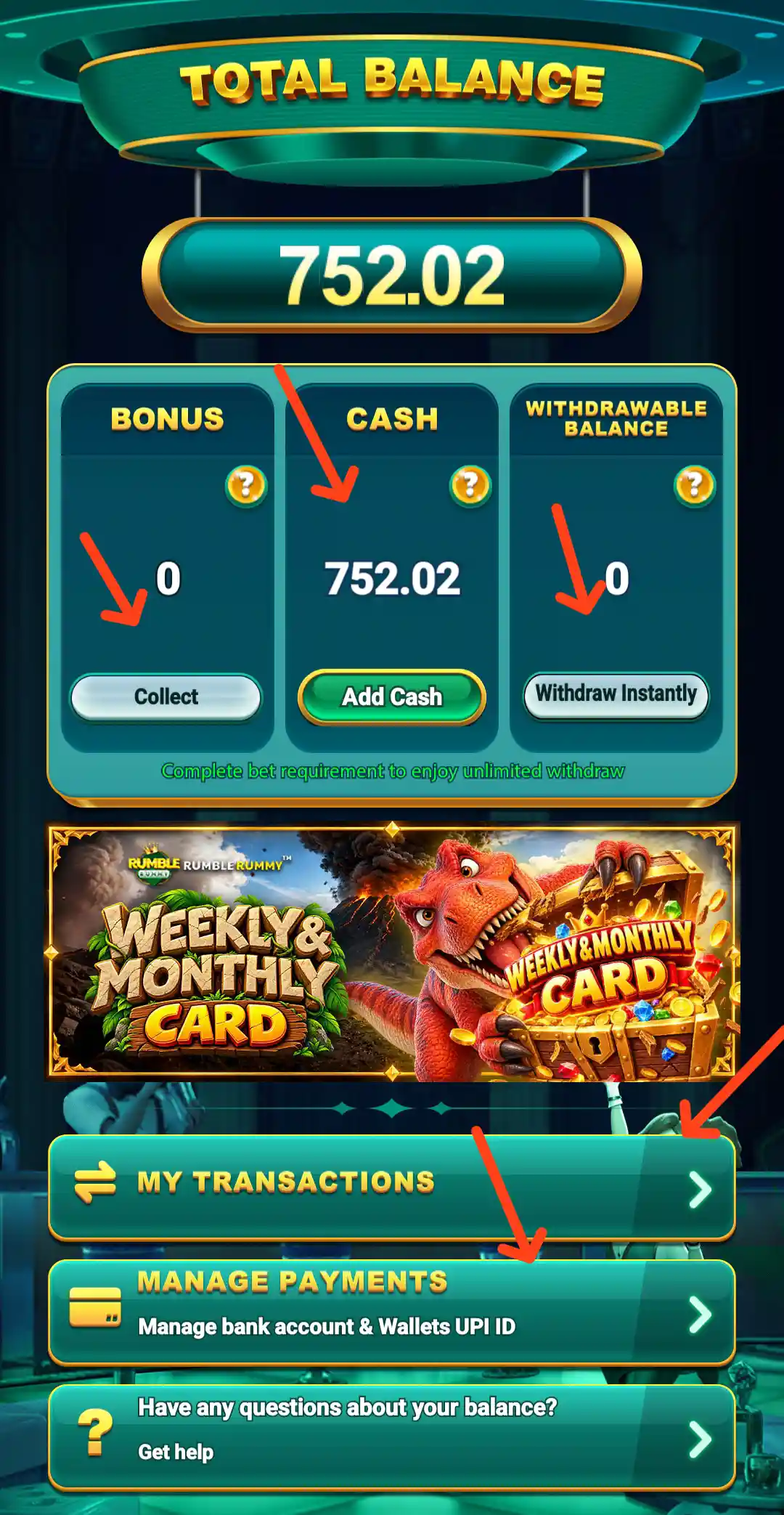
The Total Balance screen separates the account amount into Bonus, Cash and Withdrawable categories. It also provides a Manage Payments option, with the supporting text “Manage bank account & Wallets UPI ID”, and a Get Help link for balance-related questions. The screen's displayed total is an account snapshot; the amount shown in a live account can be different.
These balance labels should not be treated as interchangeable. Bonus and cash may have different usage rules, and the withdrawable figure is the one to check when reviewing a withdrawal request. Open the relevant details in the app to understand the available amount and any conditions.
Rumble Rummy Deposit: UPI and Upay Wallet
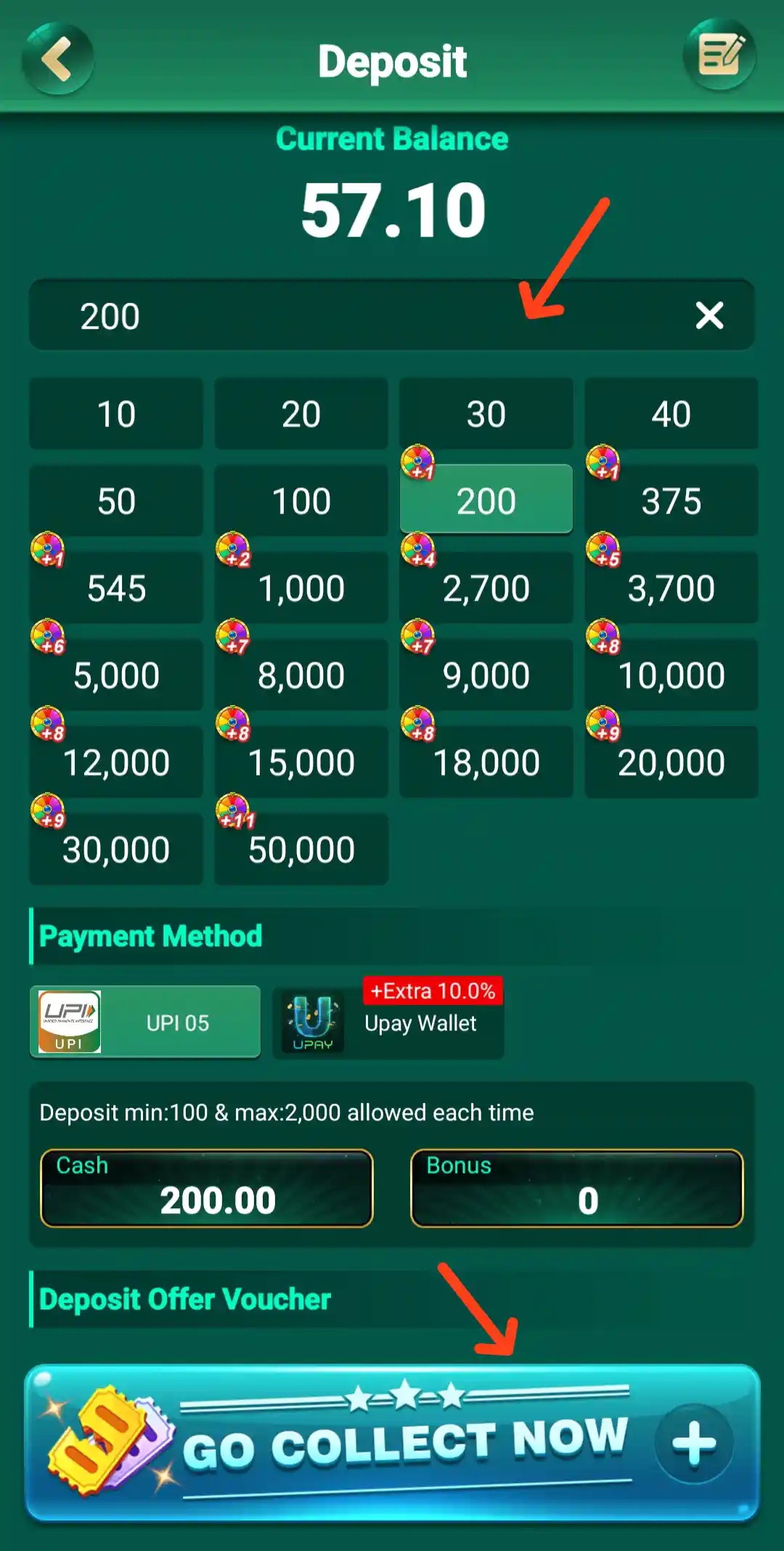
The Deposit page shows the current balance at the top, an amount field and a grid of preset values. The visible amount buttons include ₹10, ₹20, ₹30, ₹40, ₹50, ₹100, ₹200, ₹375, ₹545, ₹1,000, ₹2,700, ₹3,700, ₹5,000, ₹8,000, ₹9,000, ₹10,000, ₹12,000, ₹15,000, ₹18,000, ₹20,000, ₹30,000 and ₹50,000. The screen separately states: Deposit min: 100 & max: 2,000 allowed each time. This displayed transaction limit should be checked again before making a deposit because the preset grid includes larger values than the stated per-transaction maximum.
The payment method section shows UPI 05 and Upay Wallet. The Upay Wallet tile carries a +Extra 10.0% label. Treat this as an offer label rather than guaranteed additional cash; the conditions should be reviewed in the app. The lower part of the Deposit screen displays Cash and Bonus figures and a Deposit Offer Voucher banner with a GO COLLECT NOW button.
How to deposit in Rumble Rummy
- Open the Bank section from the bottom navigation.
- Choose Deposit and check the current balance displayed at the top.
- Enter an amount or select an available preset, while following the current per-transaction limit shown on the screen.
- Select an available payment method, such as UPI 05 or Upay Wallet.
- Review any extra offer or voucher conditions before confirming a payment.
- Keep the transaction reference and check the account balance or records after payment.
Never share your UPI PIN, banking OTP or card PIN. If a transaction remains pending, use the in-app support route and retain the payment reference. Do not make a second payment solely because an outside person asks you to.
Rumble Rummy Manage Payments
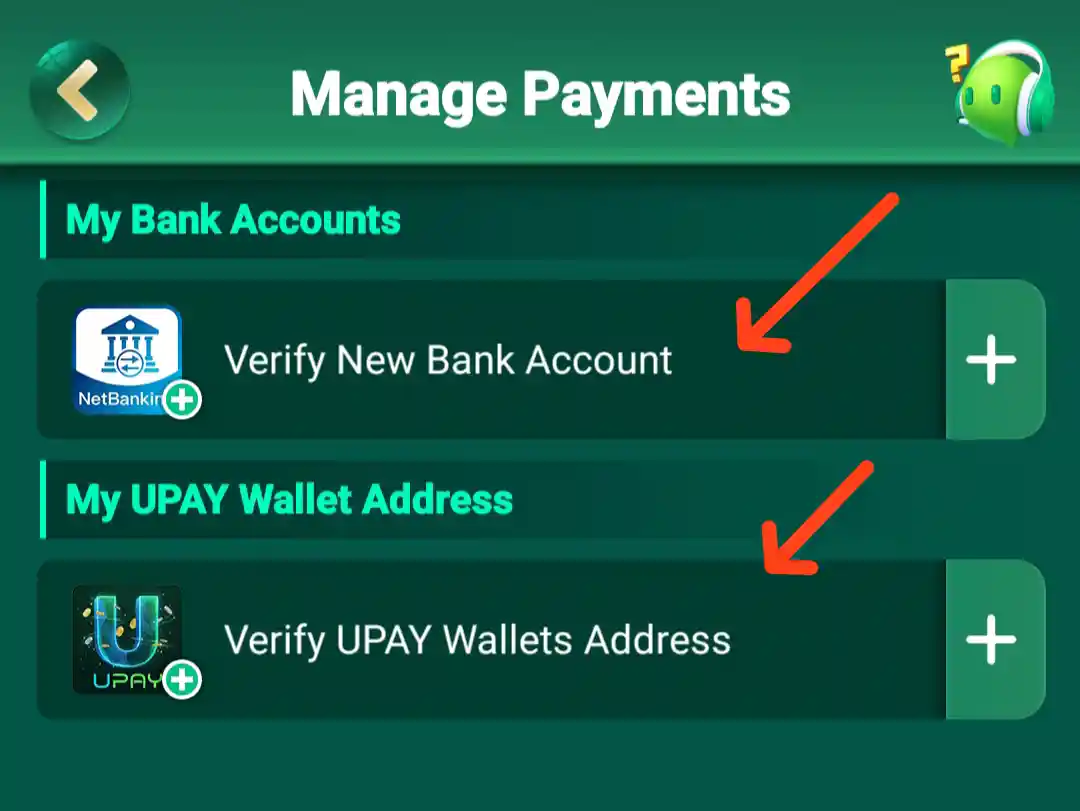
The Manage Payments screen contains a My Bank Accounts section and two separate actions: Verify New Bank Account and Verify UPAY Wallets Address. This is the payment-management area to use when setting up or reviewing the account's bank or UPAY wallet details. The screen does not show a general editable payment list; it directs the user to the relevant verification flow.
Before submitting financial information, check that you are inside the correct app account and read the on-screen notice. Enter only details that belong to you and avoid sharing sensitive account information through chat or social media.
Rumble Rummy Bank Account Verification
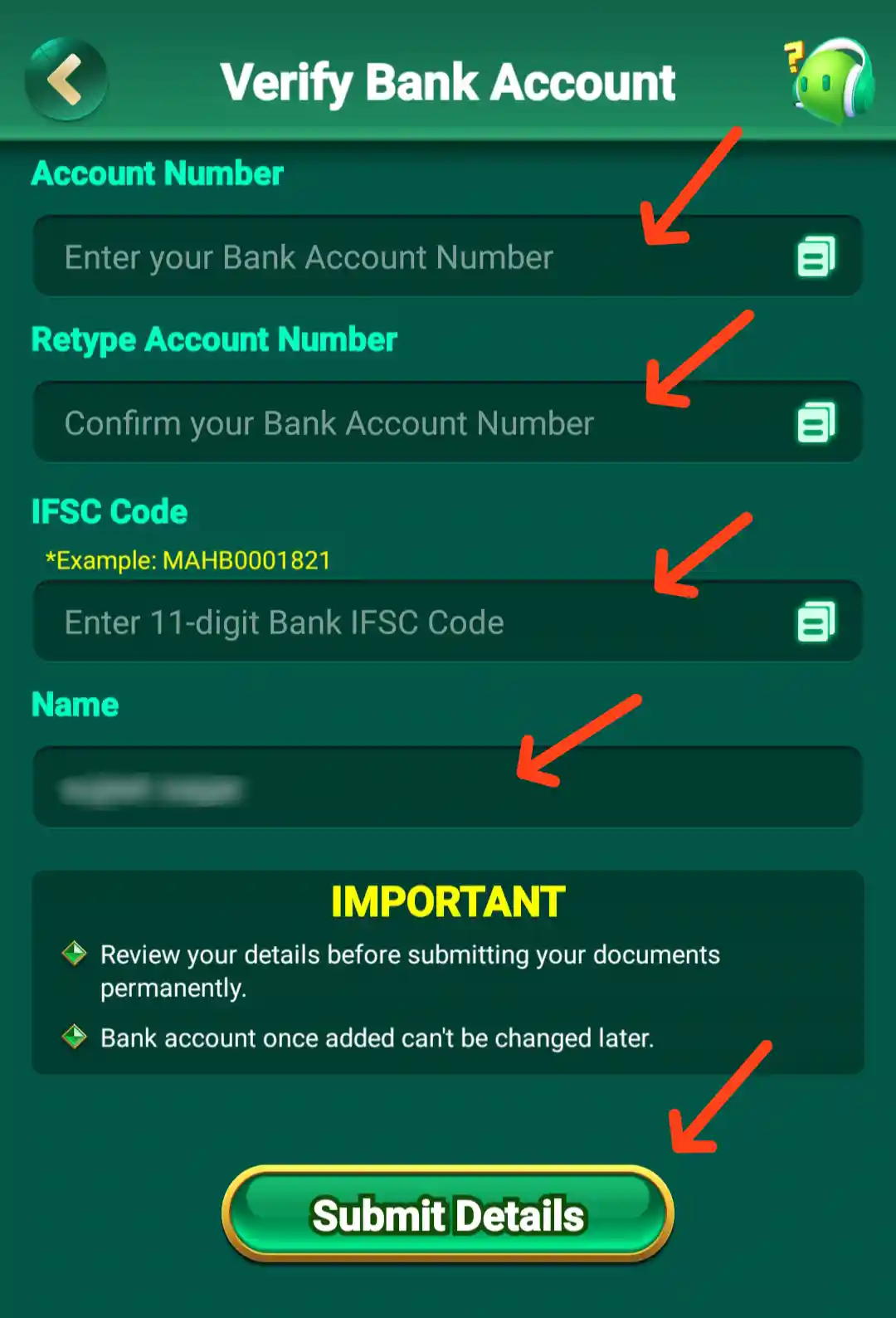
The Verify Bank Account form asks for the account number, a second entry to retype the account number, an IFSC code and the account-holder name. The IFSC field gives an 11-digit example. The notice asks users to review their details before submitting documents permanently and states that a bank account, once added, cannot be changed later.
Check the account number and IFSC carefully before submitting. The account should belong to you, and the account-holder name should match the bank's records. Since the screen warns that the bank account cannot be changed later, do not rush through this step. Contact the in-app support team if any field or requirement is unclear.
Rumble Rummy UPAY Wallet Verification
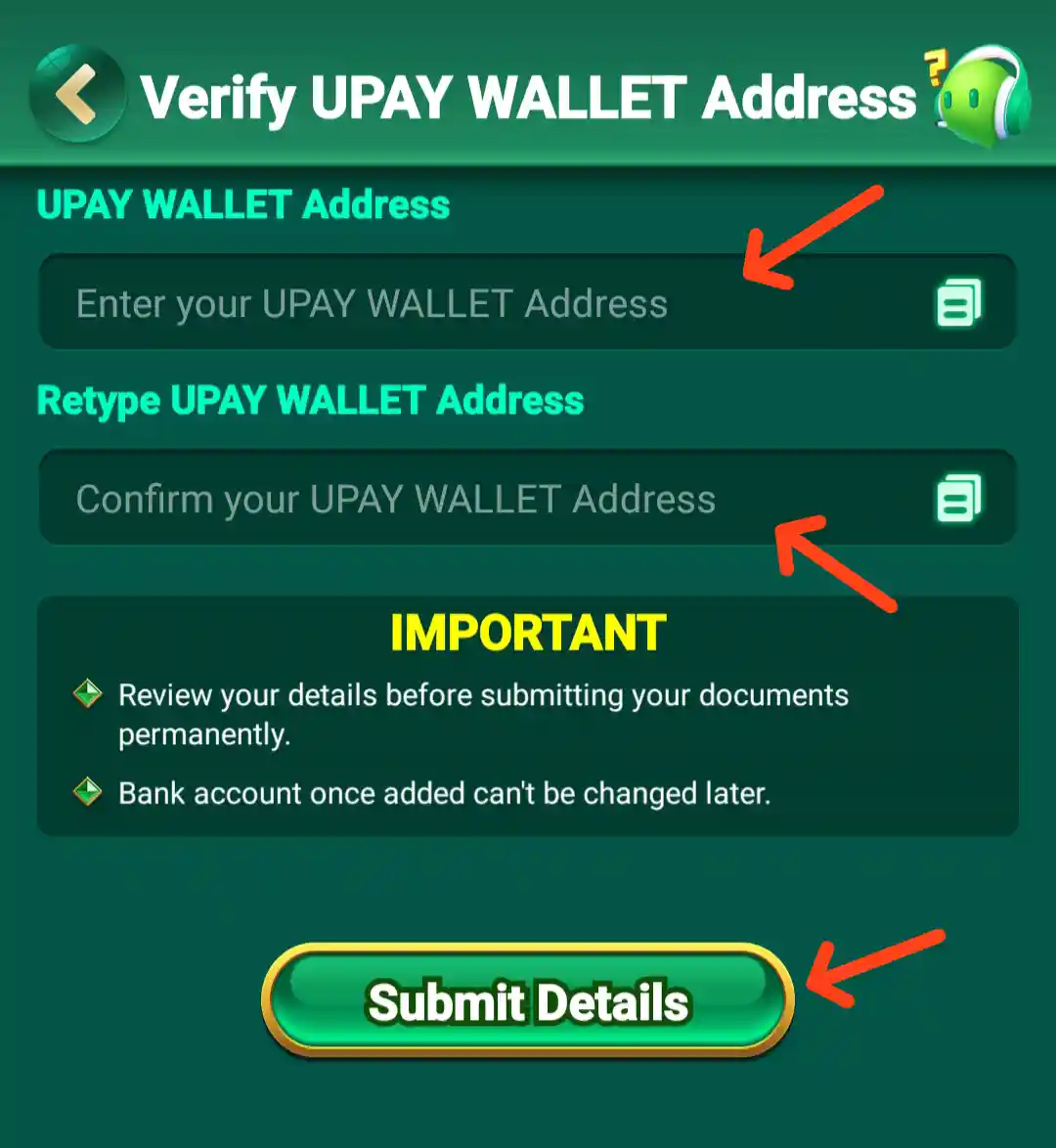
The Verify UPAY WALLET Address form has fields for the UPAY WALLET Address, Retype UPAY WALLET Address and Confirm your UPAY WALLET Address. The notice asks users to review their details before submitting documents permanently and repeats that a bank account, once added, cannot be changed later.
Enter the wallet address carefully and compare all repeated entries before using Submit Details. If the app requires a particular wallet identifier format, follow the instructions shown in the form. Do not send your wallet credentials or verification information to an unrelated person.
Rumble Rummy Free Cash
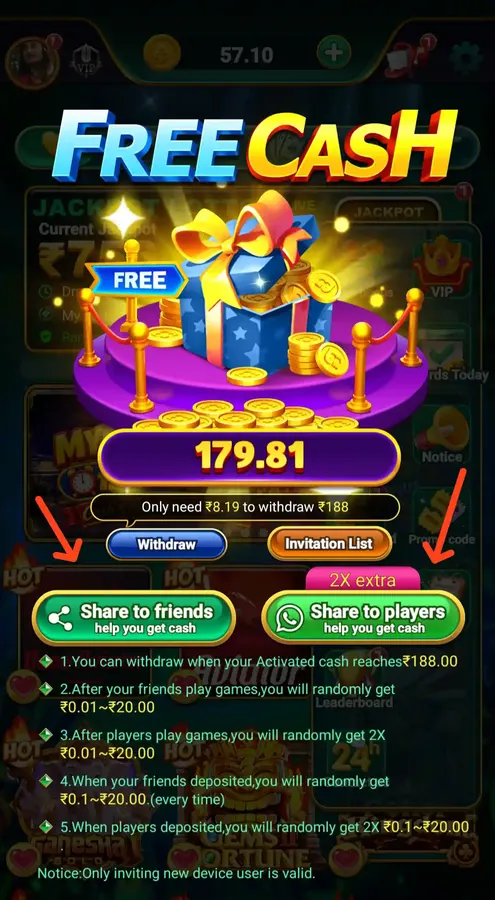
Free Cash is available from the dashboard shortcut menu. The promotion screen shows a sample amount of ₹179.81 and the message that ₹8.19 more is needed to withdraw ₹188. It includes two sharing buttons: Share to friends and Share to players; the second is marked 2X extra.
The explanatory text on the promotion describes variable rewards connected with friends' and players' game activity and deposits. It states that activated cash can be withdrawn when it reaches ₹188.00, and it also says that only invitations from a new-device user are valid. The amounts shown are described as random ranges, not fixed payouts. The ₹179.81 balance is the example shown in the screen and should not be treated as a guaranteed amount for every account.
Before sharing an invitation, read the current Free Cash rules and check the difference between promotional cash, activated cash and the balance that is actually eligible for withdrawal.
Rumble Rummy Refer and Earn Programme
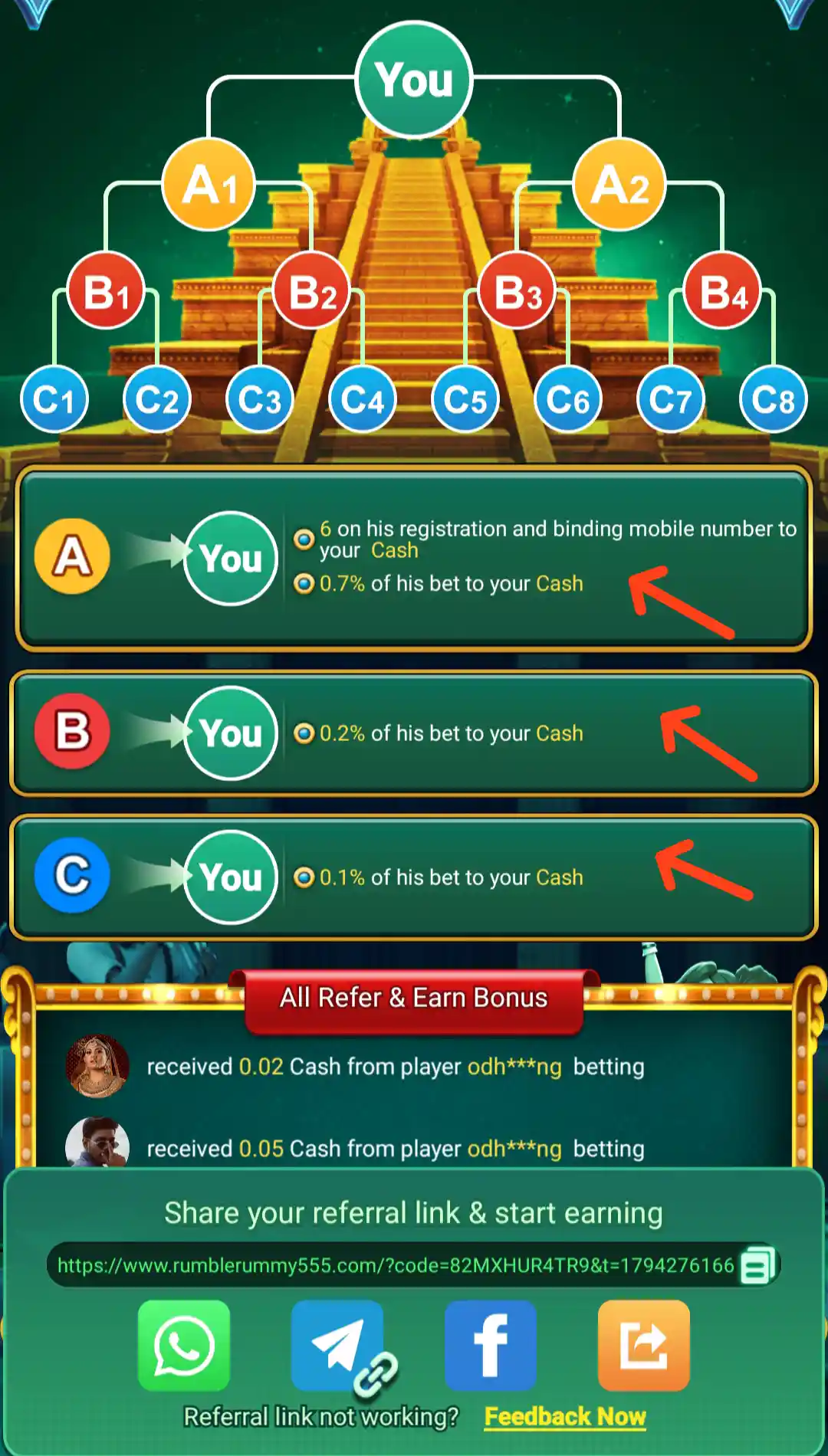
The Refer & Earn feature provides a referral link and sharing options. The referral information supplied for this page lists ₹6+ referral bonus and 0.7% bet commission when a friend downloads and registers, subject to the programme's terms. The referral screen also describes commission at different levels and states that the direct referral's registration and mobile-number binding to cash are part of the Level A condition.
- Level A – direct referral: the screen states ₹6 on registration and binding the mobile number to Cash, plus 0.7% of the referred player's bet to your Cash.
- Level B: 0.2% of the referred player's bet to your Cash.
- Level C: 0.1% of the referred player's bet to your Cash.
The referral page shows a shareable link, a copy control and a Feedback Now option for a referral link that is not working. It also shows examples of small cash credits received from players' betting activity. Those examples are account activity records, not a promise that every referral will generate the same amount. Referral rewards and commissions depend on valid registrations, eligible activity and the latest programme conditions.
Rumble Rummy Referral Rewards and Cash History
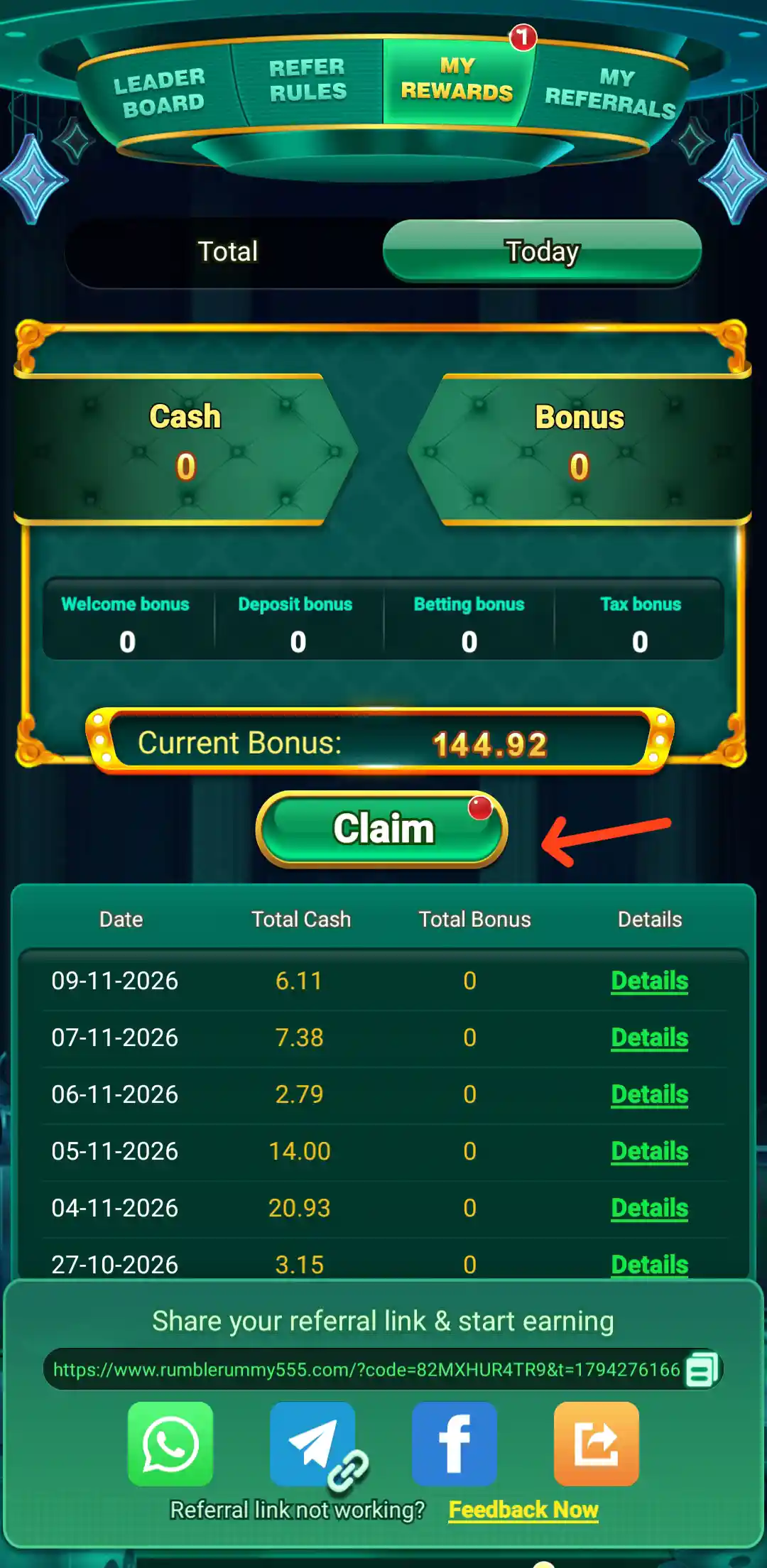
The Referral Rewards screen provides a summary of referral-related activity. It displays Total and Today figures for Cash Bonus, along with a Current Bonus value. A dated history table lists Total Cash, Total Bonus and Details. The supplied screen shows example entries dated 09-11-2026, 07-11-2026, 06-11-2026, 05-11-2026, 04-11-2026 and 27-10-2026.
This page is useful for checking whether referral-related cash activity has been recorded and for reviewing the date-wise history. The amounts shown in the screenshot are a snapshot of that account at that time; they are not standard rewards or guaranteed earnings for other users. Use the current account screen to check your own totals and details.
Rumble Rummy Invite Reward Chest
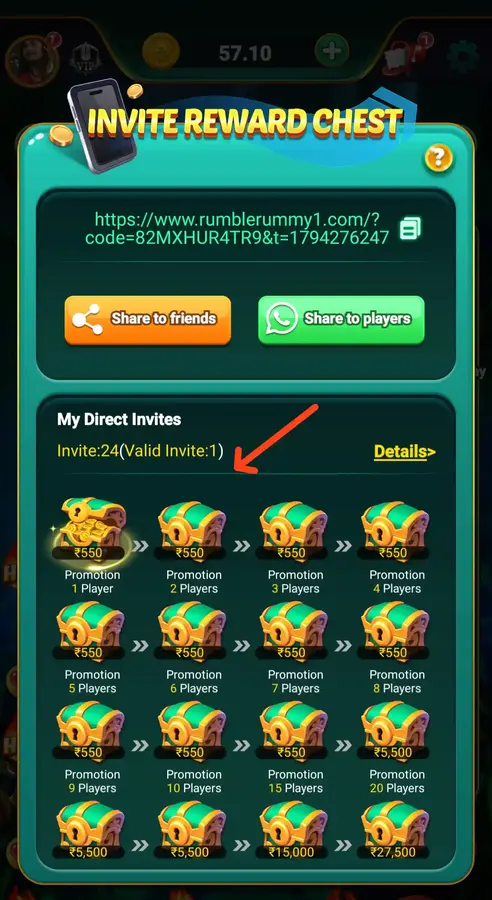
The Invite Reward Chest page displays a personal invitation URL, a copy option, and buttons for Share to friends and Share to players. Below that, the My Direct Invites section shows the number of invites and valid invites. The supplied screen shows Invite: 24 (Valid Invite: 1) for the account represented in that screenshot.
The chest area lists promotion milestones for 1, 2, 3, 4, 5, 6, 7, 8, 9, 10, 15 and 20 players. The visible chest values are ₹550 for the first milestones, with higher displayed values at later milestones: ₹5,500 at 15 players, ₹5,500 at 20 players, ₹15,000 at the next shown milestone and ₹27,500 at the final shown milestone. Because the image's lower labels are visually compressed, use the in-app Details link to confirm the exact qualifying invite count and claim requirements for each reward.
Do not count every shared link as a valid invite. The page separates total invites from valid invites, which means the programme applies its own validity checks. Review those rules before expecting a chest to unlock.
Rumble Rummy Return Bonus
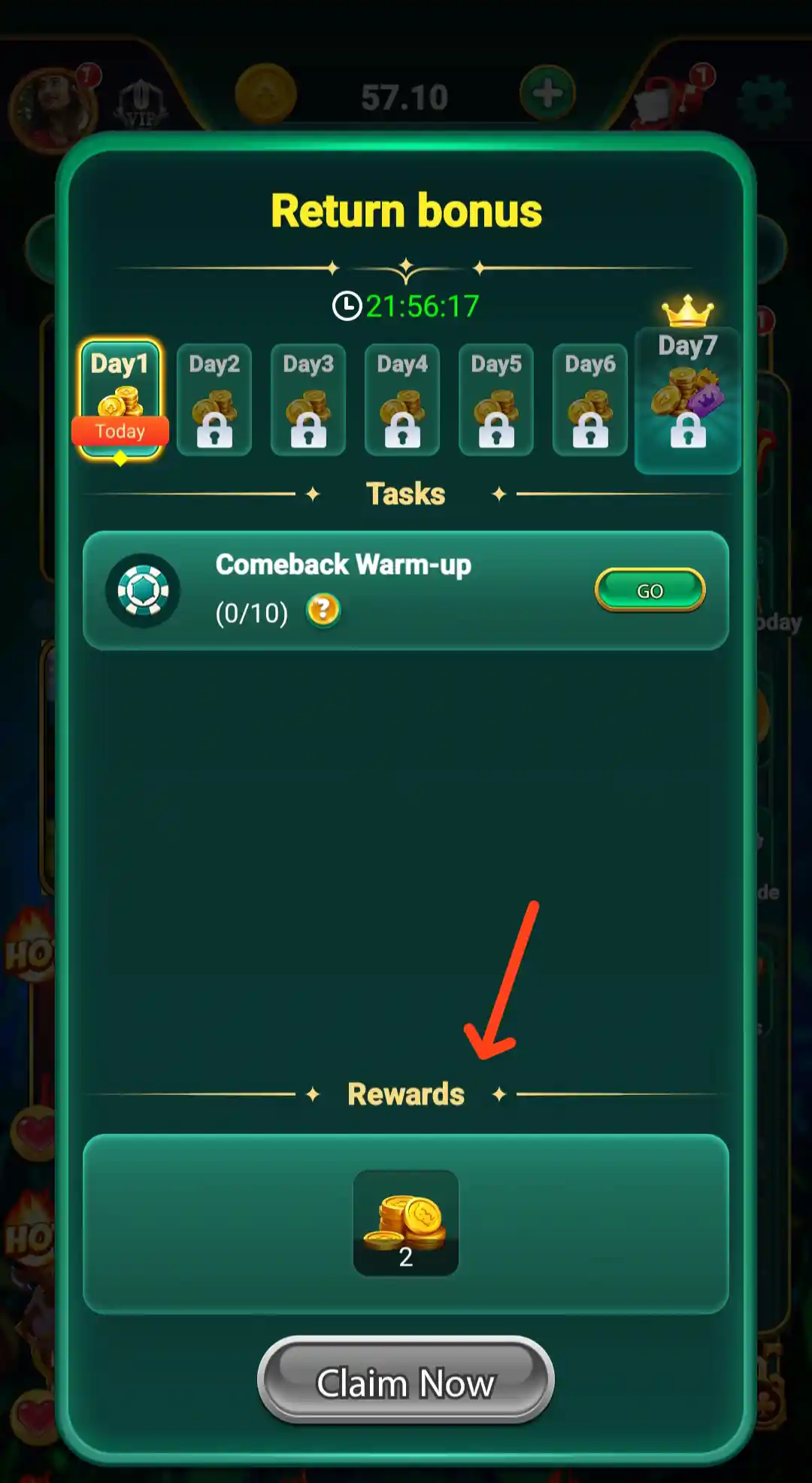
The dashboard includes a Return Bonus shortcut. Its screen is arranged as a day-based reward activity and visibly marks Day 3 and Day 7, with reward chests and a Claim Now button. This section appears to be designed around returning to the app on the displayed days to check or claim the relevant bonus.
Open the Return Bonus page to see the active countdown, eligible days and claim status. The screenshot shows a countdown-style timer, so the exact claim window can be time-sensitive. Read the on-screen terms and do not assume a chest is claimable until the app enables the claim action.
Rumble Rummy Rewards Today
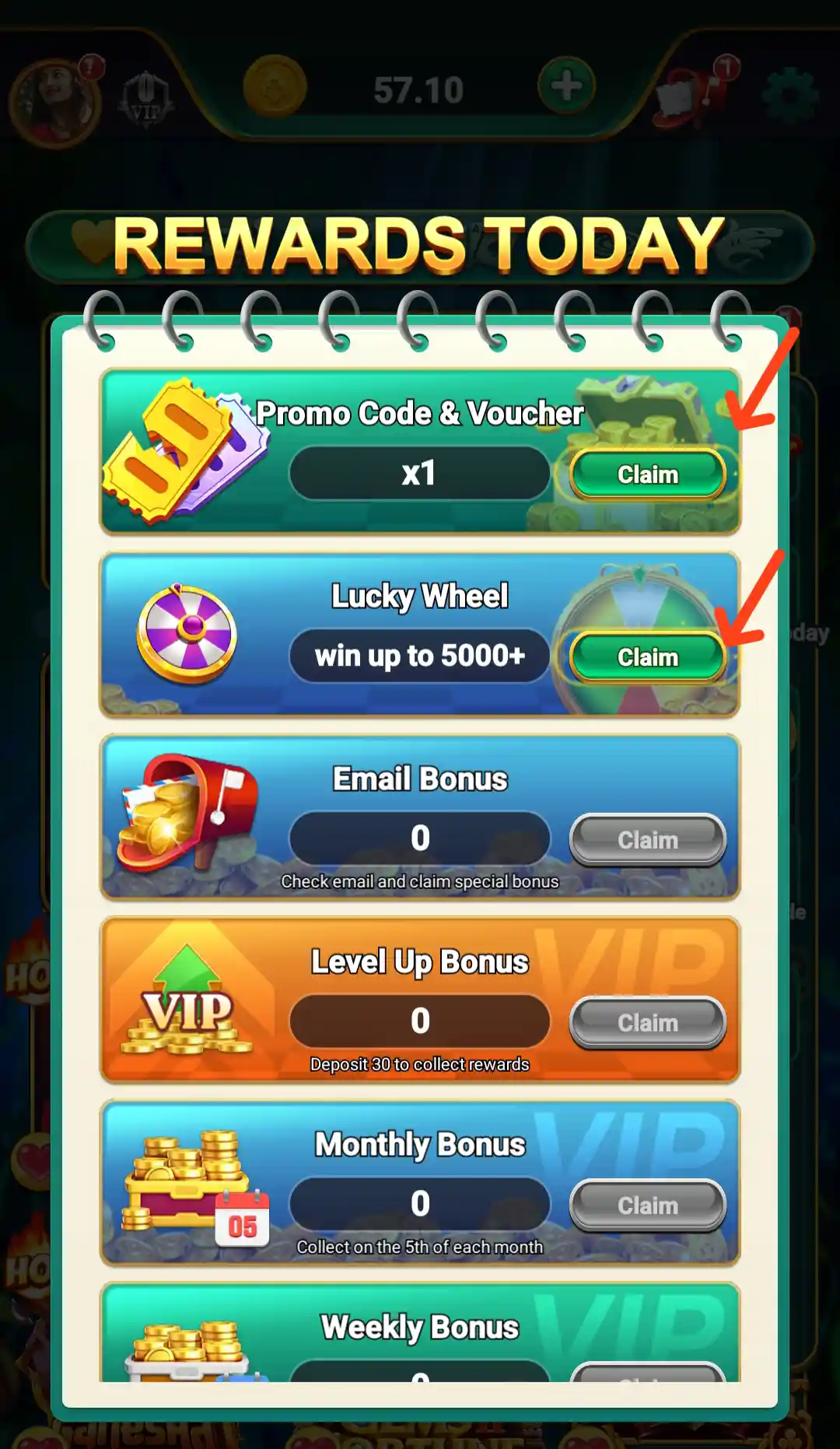
The Rewards Today menu opens a page containing several reward activities. The visible entries include Promo Code & Voucher, Lucky Wheel with a “win up to 5000+” promotional line and a Claim option, Email Bonus with a prompt to check email and claim a special bonus, Level Up Bonus, and a Monthly Bonus section. The page also displays a deposit-related task with the wording “Deposit 30 to collect rewards” and says the monthly bonus can be collected on the 5th of each month.
These entries are separate tasks with their own eligibility. Check whether a task requires an email check, a qualifying deposit, a level change or a particular claim date. A displayed maximum or promotional value is not a guaranteed reward for every account.
Rumble Rummy Promo Code and Voucher
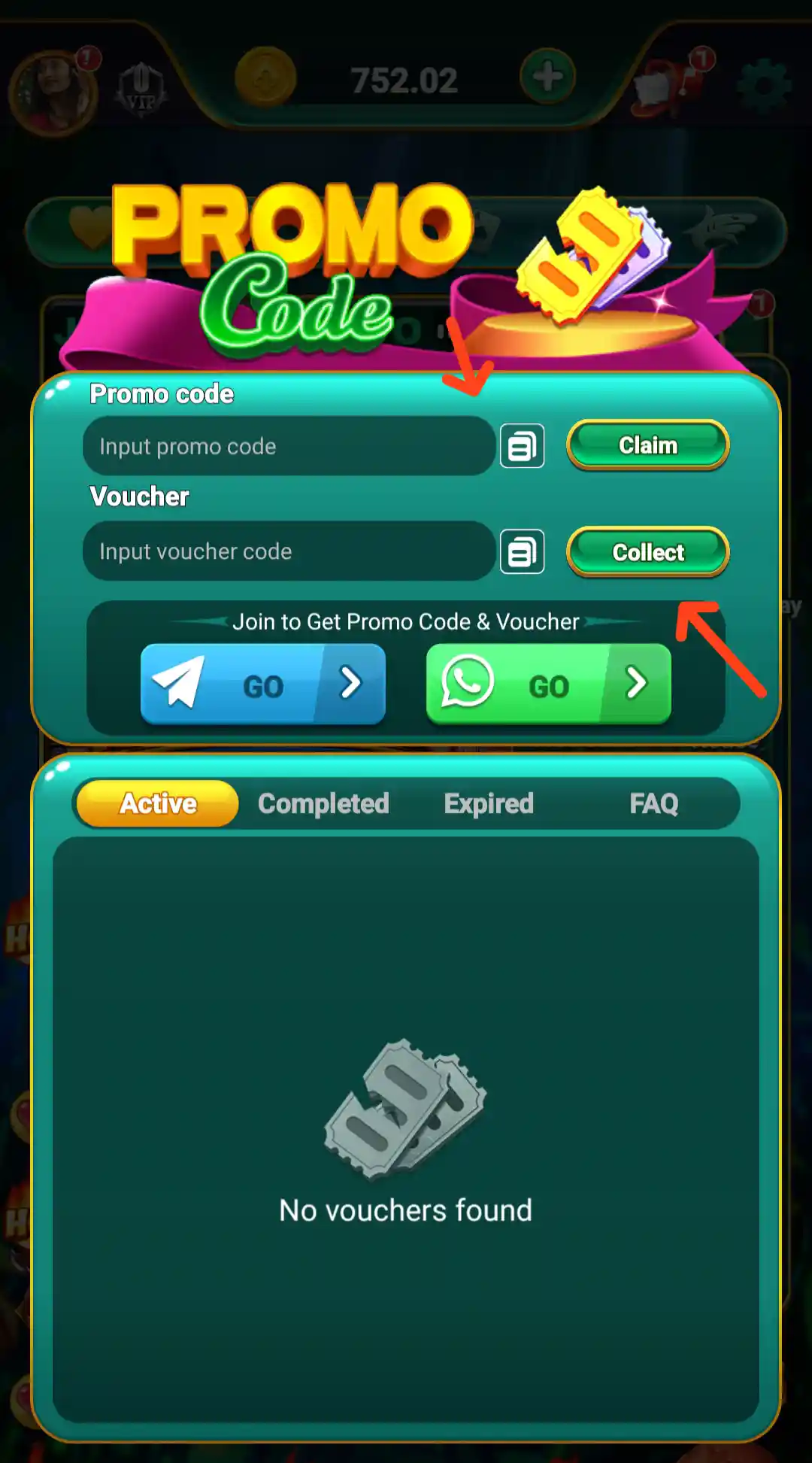
The Promo Code page has an input field labelled Input voucher code and a Collect action. A banner below invites users to join to get a promo code and voucher. The page also has tabs for Completed, Expired and FAQ. The supplied screen shows “No vouchers found” in the list, which means no voucher was listed in that particular account view at the time of the screenshot.
If you receive a valid promo code through an official app promotion, enter it in the voucher field and review the result shown by the app. Check the expiry date and account eligibility. Avoid code lists or messages from unknown sources that ask for a deposit or personal details to unlock a voucher.
Rumble Rummy Lucky Wheel
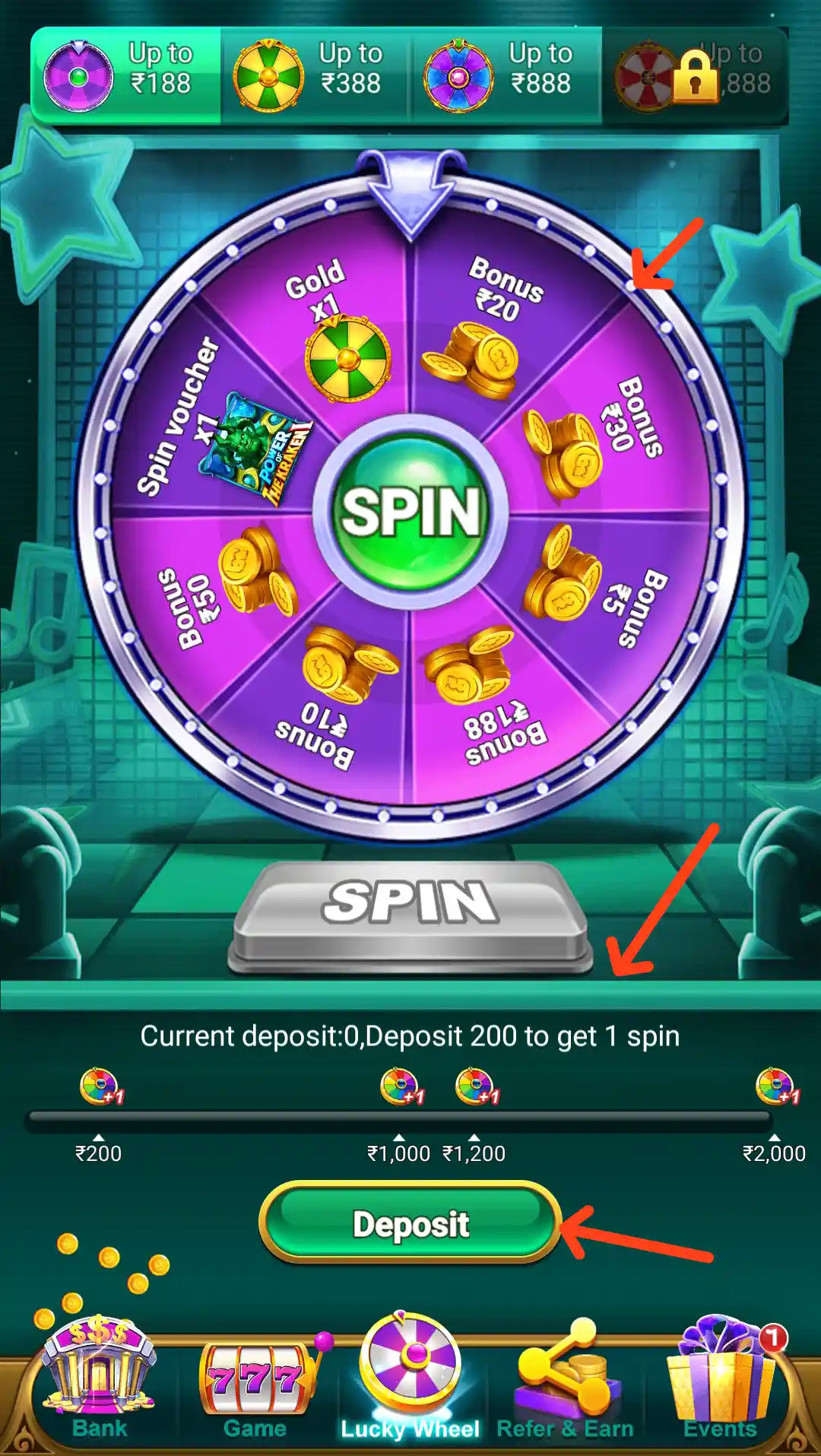
The Lucky Wheel section displays a prize wheel and a central SPIN control. The information beneath it states Current deposit: 0, Deposit 200 to get 1 spin. Preset deposit values are shown underneath, including ₹200, ₹1,000, ₹1,200 and ₹2,000. The screen therefore connects the displayed spin opportunity with a deposit condition.
Before using the wheel, check the current qualifying deposit, number of spins, reward rules and expiry. A spin is a chance-based promotional activity, not a guaranteed cash return. Do not deposit money only to chase a wheel reward.
Rumble Rummy Weekly and Monthly Cards
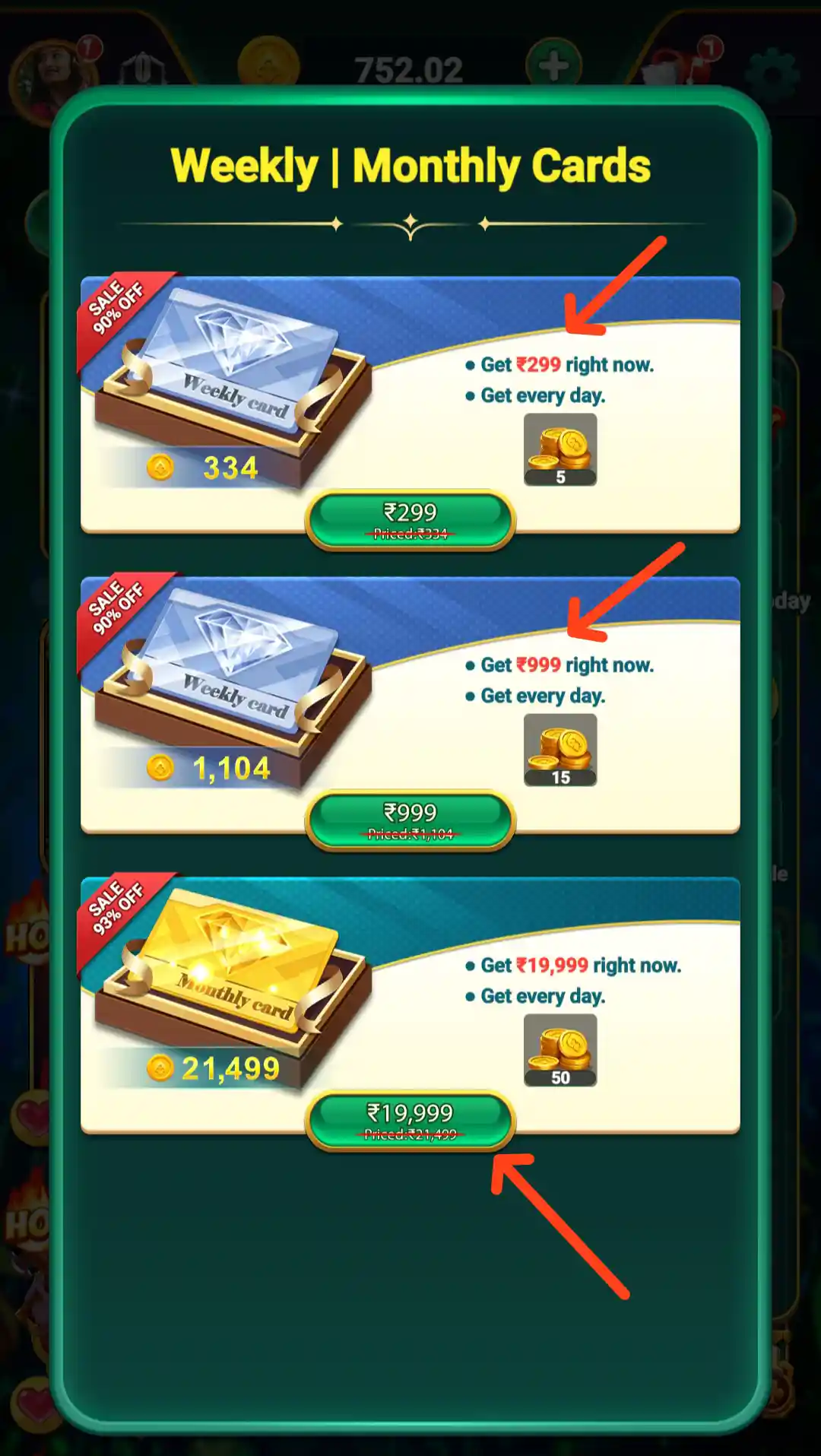
The Weekly | Monthly Cards page displays multiple card-style offers with separate prices and action labels such as Get right now and Get every day. The page groups these offers into weekly and monthly card choices. The screenshot contains several amount labels, but the full offer terms and exact benefit schedule are not legible enough to state as fixed values here.
Open each card in the app to review its price, duration, reward schedule, renewal or expiry information and any withdrawal conditions. Compare the full terms before selecting a card, and do not assume that the amount shown is a cash balance or a guaranteed profit.
Rumble Rummy VIP Plan and Privileges
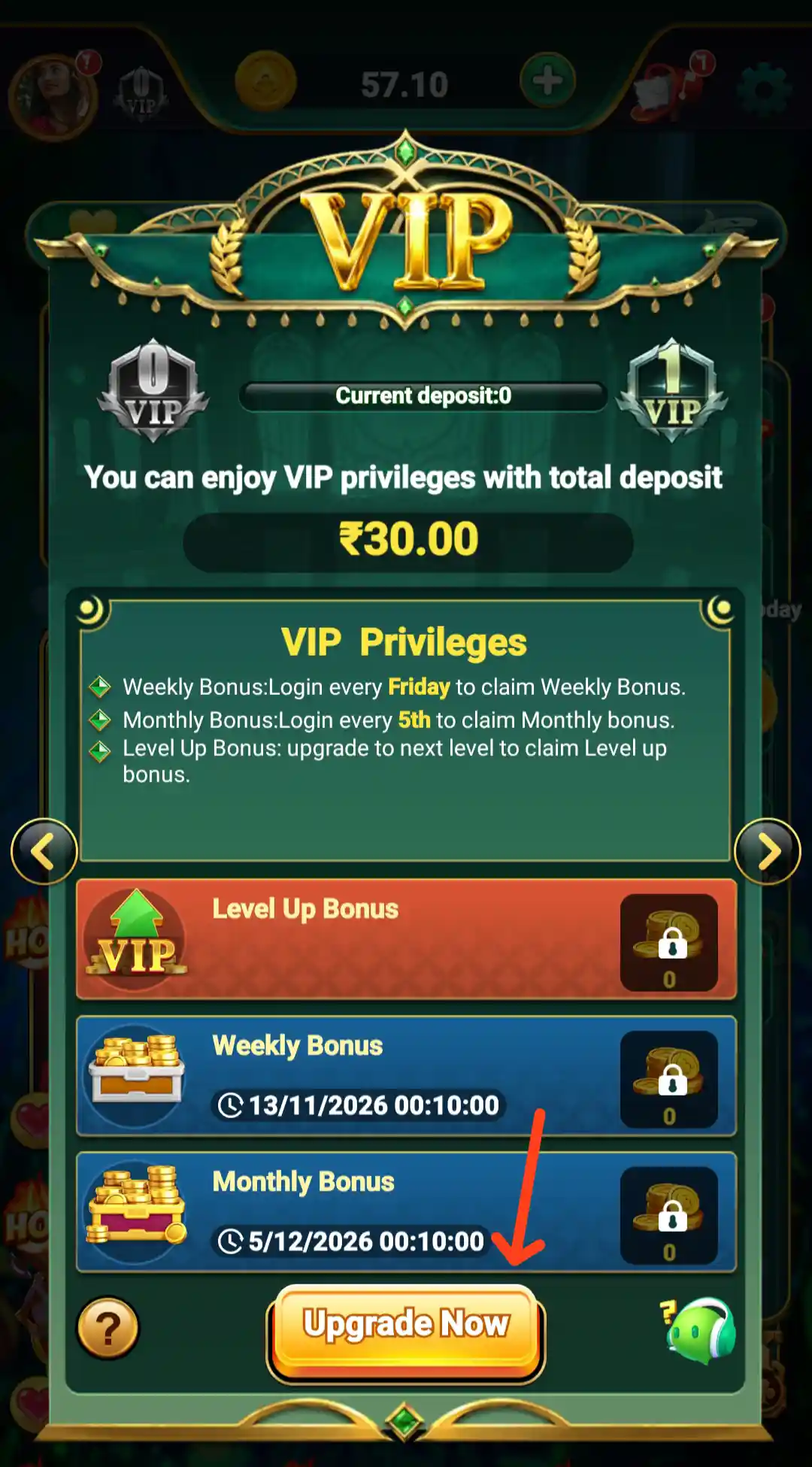
The VIP Plan page explains that VIP privileges are connected with the user's total deposit. The supplied screen states that VIP privileges can be enjoyed with a total deposit of ₹30.00. The visible benefit list includes:
- Weekly Bonus: log in every Friday to claim the weekly bonus.
- Monthly Bonus: log in every 5th to claim the monthly bonus.
- Level Up Bonus: upgrade to the next level to claim the level-up bonus.
The screen also shows separate Weekly Bonus and Monthly Bonus entries with dates and amounts. Those are time-sensitive account displays and can change. Check the current VIP level, qualifying deposit, claim date and available amount in the app before relying on a benefit.
Rumble Rummy Leaderboard and Daily Prizes
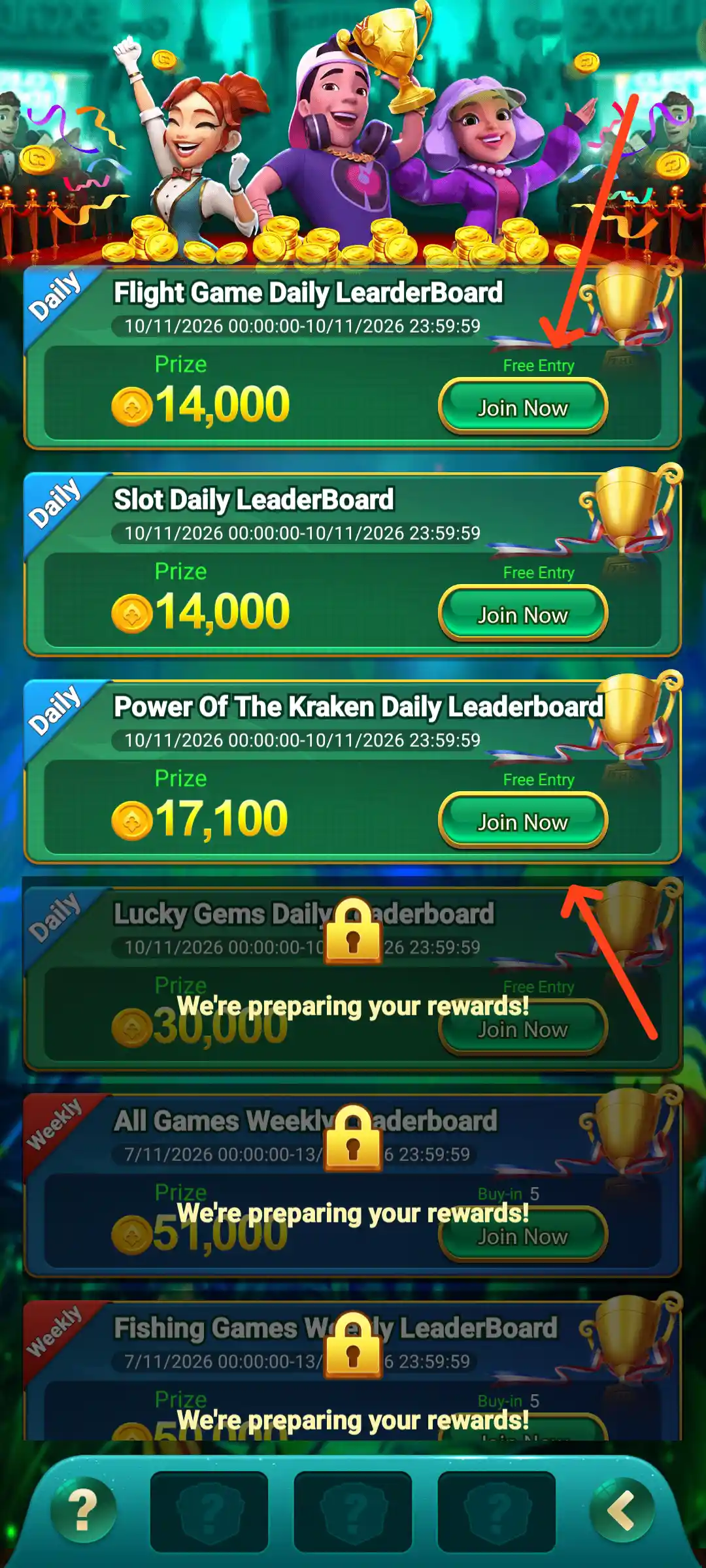
The Leaderboard screen lists daily competitions for different categories. The supplied screen shows Flight Game Daily Leaderboard with a displayed prize of ₹14,000, Slot Daily Leaderboard with ₹14,000 and Power Of The Kraken Daily Leaderboard with ₹17,100. Each visible daily listing shows a date range and a Free Entry label.
Other entries include Lucky Gems, All Games Weekly Leaderboard and Fishing Games Weekly Leaderboard. Some of these sections display “We're preparing your rewards!” rather than a completed ranking. Check the active date range, game category, ranking rules and reward claim details inside the app. Prize amounts are leaderboard promotions and are not guaranteed payments to every participant.
Rumble Rummy Jackpot Lotto
The Jackpot Lotto panel is visible near the top of the home lobby and is marked LIVE. It displays a changing Current Jackpot amount, a Draw In countdown, My Lotto Tickets and a View Jackpot button. The supplied screens show different jackpot figures at different moments, which confirms that the number is a changing display rather than a fixed app detail. The ticket counter shown is 0/100 and the panel includes the phrase Random & Provably Fair.
Open View Jackpot to read the current ticket, draw and participation details. Check whether a ticket or entry is required and what the applicable rules say about winner selection and claiming a prize. A jackpot banner or large amount should never be read as a guaranteed earning.
Rumble Rummy Customer Support and Contact Us
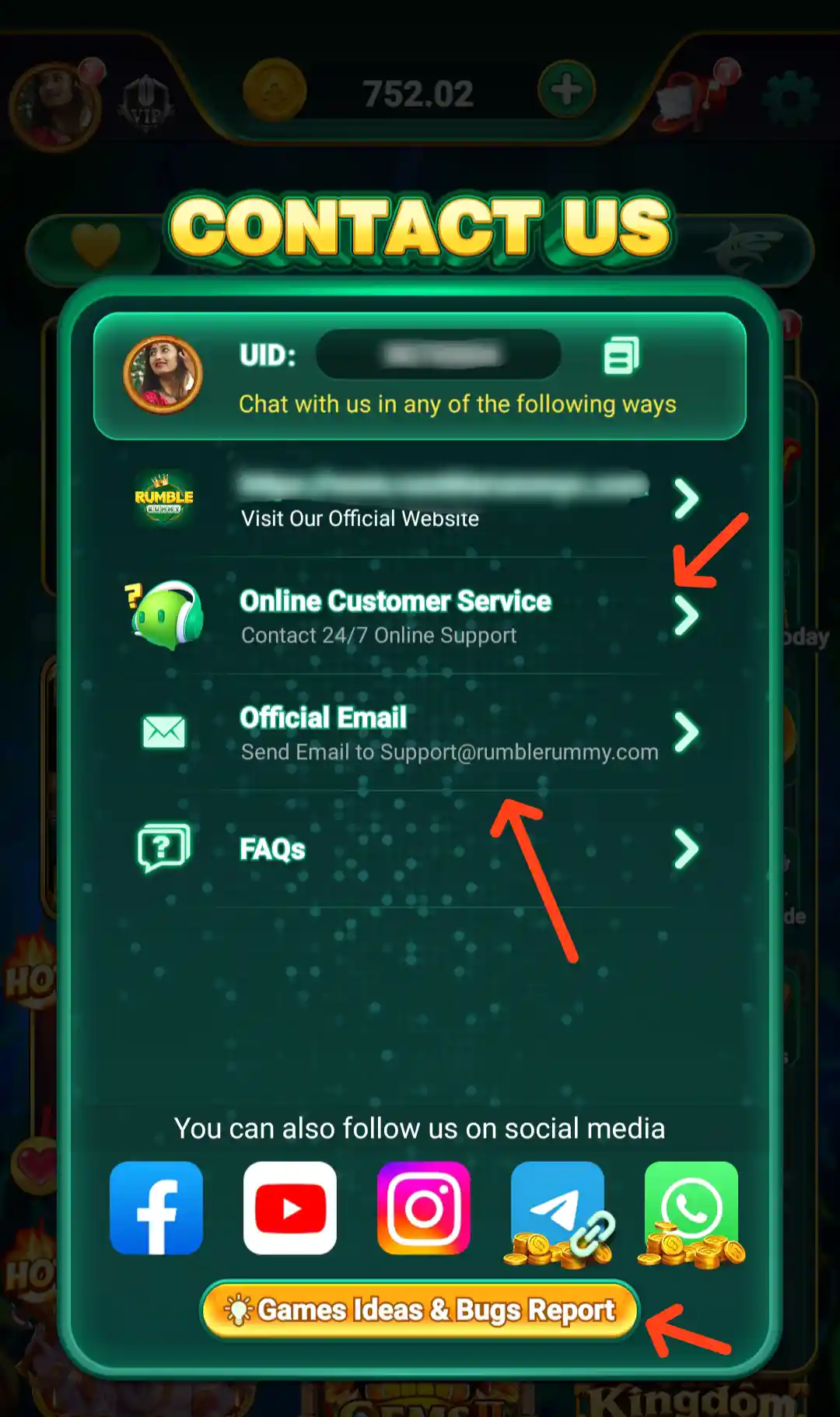
The Contact Us panel offers several ways to reach the service. It lists Visit Our Official Website, Online Customer Service with a “Contact 24/7 Online Support” label, Official Email and FAQs. The email address printed on the supplied screen is [email protected].
The same panel also shows social-media shortcuts for Facebook, YouTube, Instagram, Telegram and WhatsApp, plus a Games Ideas & Bugs Report button. For a login, deposit or account issue, use the support route available in the app and share only the details needed to explain the problem. Never send a password, OTP, UPI PIN or full banking credentials to a social account or support contact.
How to Download Rumble Rummy APK
To download the Rumble Rummy App, tap the Download Official APK button near the top of this page. The button is connected to the download URL supplied for this guide. After opening the destination, follow the download instructions displayed there and check the file details before installing it on your Android phone.
- Tap the Download Official APK button on this page.
- Wait for the official download page to open and follow the APK download option shown there.
- Check that the downloaded file is the Rumble Rummy APK and wait for the download to finish.
- Open the APK file from your phone's Downloads folder.
- If Android displays an install-from-this-source permission, review it and continue only if you trust the source.
- Complete installation, open the app and choose the account access option available to you.
The listed Rumble Rummy APK size is 102 MB. The size may change if the app is updated, so compare it with the current download page. Do not install files from unknown messages or websites, and review requested permissions before continuing.
For another walkthrough, you can also read our Rumble Rummy APK Download guide on Allyono Pro. It is a related article covering Rumble Rummy App Download and installation information.
Rumble Rummy App: Important Checks Before Using It
- Review the app's current terms, age requirements and local laws before installing or using it.
- Check the deposit page's stated minimum of ₹100 and maximum of ₹2,000 per transaction; confirm the current limit in the app.
- Understand the difference between Bonus, Cash and Withdrawable balances.
- Check bank and UPAY wallet details carefully because the verification screens warn that submitted bank details cannot be changed later.
- Referral, login, VIP, wheel and leaderboard rewards are subject to their own eligibility and claim rules.
- Never share passwords, OTPs, UPI PINs or banking credentials.
- Set a personal spending limit and do not borrow money or chase losses.
Frequently Asked Questions About Rumble Rummy
What is Rumble Rummy?
Rumble Rummy is an Android app with multiple game categories, including 777 Slots, Multiplayer, Skill Games, Aviator-style flight games and Fishing, along with wallet, reward and referral features.
How can I download Rumble Rummy APK?
Tap the Download Official APK button at the top of this page and follow the download instructions on the destination page. Check the APK file details and permissions before installing.
What is the Rumble Rummy APK size?
The listed APK size is 102 MB. Check the official download page for the current version's file size.
What signup bonus is listed for Rumble Rummy?
The signup bonus supplied for this listing is ₹57. The actual availability and conditions should be checked in the app.
What is the minimum withdrawal amount?
The minimum withdrawal amount provided for this listing is ₹100. Check the account's withdrawable balance and current withdrawal rules before submitting a request.
Which payment methods are shown on the Deposit page?
The supplied Deposit screen shows UPI 05 and Upay Wallet. The Upay Wallet tile displays a +Extra 10.0% label, subject to the offer terms.
What are the deposit limits shown in Rumble Rummy?
The Deposit screen states a minimum of ₹100 and a maximum of ₹2,000 allowed each time. Confirm the latest limit in your account before payment.
How do I verify a bank account?
Open Manage Payments, choose Verify New Bank Account and complete the account number, retyped account number, IFSC code and account-holder name fields. The form warns that a bank account cannot be changed after it is added, so verify every detail before submission.
Does Rumble Rummy support UPAY Wallet?
The Manage Payments screen includes Verify UPAY Wallets Address. Its form asks users to enter, retype and confirm the UPAY Wallet address.
What referral rewards are shown in Rumble Rummy?
The supplied details list ₹6+ referral bonus and 0.7% bet commission for qualifying direct referrals. The referral screen also shows 0.2% for Level B and 0.1% for Level C, subject to programme terms.
What is the Rumble Rummy Free Cash withdrawal threshold?
The supplied Free Cash screen states that Activated Cash can be withdrawn when it reaches ₹188. The example shown is ₹179.81 with ₹8.19 remaining; it is not a guaranteed balance for every account.
What does the Invite Reward Chest show?
It displays a personal invite link, total and valid invite counts, and reward chest milestones for different numbers of players. Open Details in the app to confirm current requirements.
When can I claim the VIP weekly and monthly bonuses?
The VIP screen says to log in every Friday for the Weekly Bonus and every 5th for the Monthly Bonus. The current account's claim dates and eligibility should be checked in the VIP section.
Does Rumble Rummy have customer support?
The Contact Us screen lists 24/7 Online Customer Service, FAQs and the email [email protected], along with social-media shortcuts.
Are jackpot, referral and promotional rewards guaranteed?
No. Promotional and reward amounts depend on the applicable rules, eligibility, qualifying activity and, where relevant, game or draw outcomes. A displayed amount should not be treated as guaranteed cash or income.
Related Rumble Rummy APK Download Guide
For another article about the Rumble Rummy App, APK download and installation, visit Rumble Rummy APK Download on Allyono Pro. This related guide provides an additional reference for visitors searching for Rumble Rummy, Rumble Rummy APK and Rumble Rummy App Download.